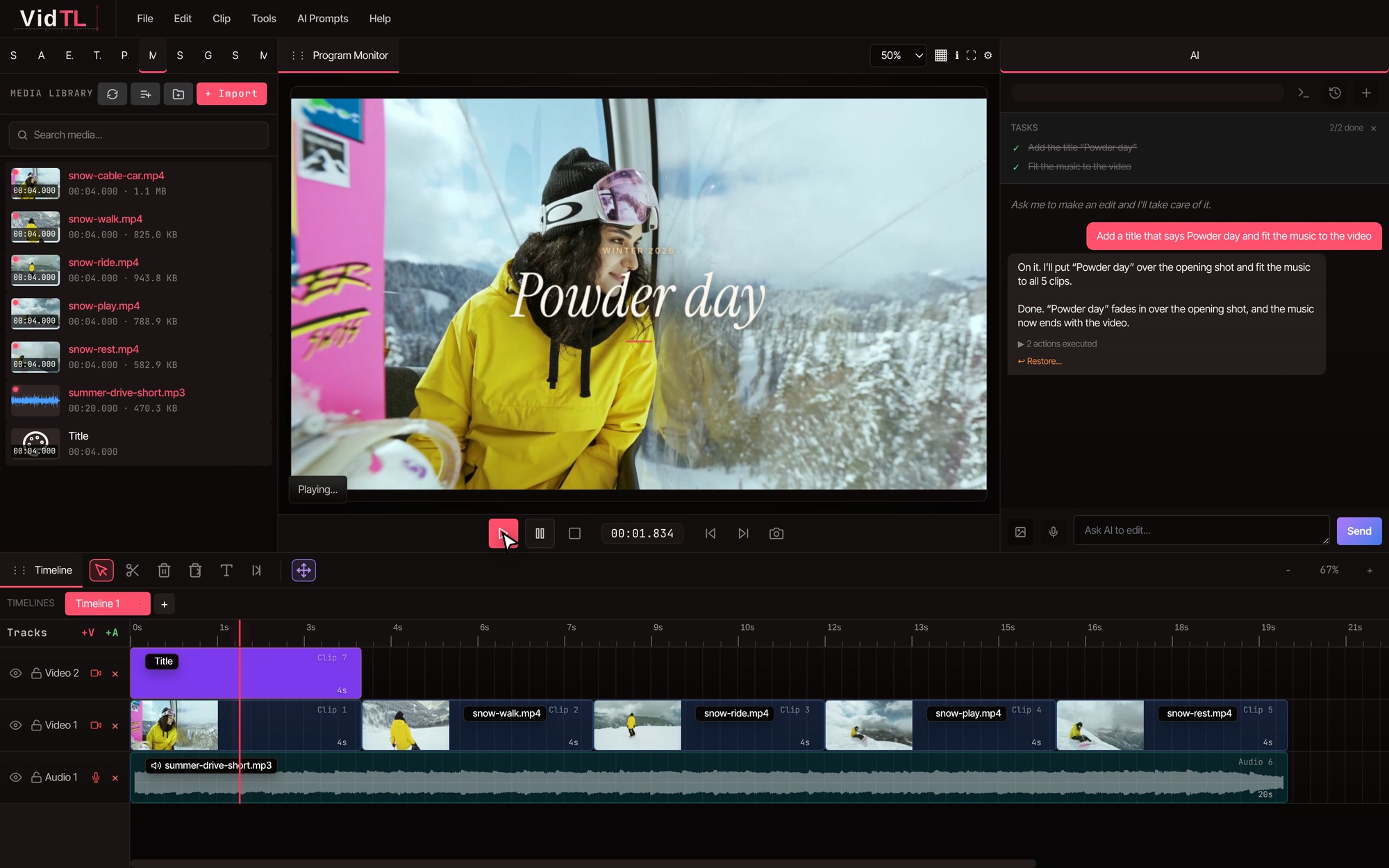
A real multi-track timeline
Unlimited video and audio tracks, frame-accurate trims, keyframes, masks and the shortcuts you already know.
Tell VidTL what to fix and it cuts the mistakes, adds captions and cleans up your sound. Or delete words from the transcript and the video cuts with them.
Ask in plain words
Edit video by editing text
VidTL writes out every word you say. Highlight a stumble, a filler word or a tangent and press delete. The picture, sound and captions go with it. No hunting for the right frame.
Drop in your footageUse the take you already recorded.
Delete the words you don’t wantYou see every cut before it happens.
Export and postOr fine-tune clips, sound and captions on the timeline first.
Try it
Try it on this clip: tap the underlined words, press Delete, then play it back. If you can delete a word, you can edit a video.
0:00.0 / 0:21.0
Suggested cuts are underlined.
Picture and sound are cut at the same moments, so nothing drifts out of sync.
AI editing assistant
Type “cut the mistakes” or “add captions to everything” and VidTL does the work: trims, captions, titles and sound clean-up. Each change is a normal edit on your timeline, so you can adjust it by hand or undo it.
The request
“Cut the mistakes.”


Automatic captions
Captions keep people watching when their sound is off. Add them to your whole video in one click, timed word by word. Fix any word by typing it, then set the font, color and size for Shorts, Reels and TikTok.
Caption style
Font
Color
Position
Every tool in one place
Drop the separate apps for captions, noise removal and background removal. VidTL has all of them, next to a full multi-track timeline.
Unlimited video and audio tracks, frame-accurate trims, keyframes, masks and the shortcuts you already know.
Cut a person out of any shot. No green screen, no masking by hand.
Take out hiss, hum and room noise, or pull a voice away from the music behind it.
VidTL finds the dead air between sentences and cuts it all at once.
VidTL hears the beat in your song and lands every cut on it.
Type a script and get a natural voiceover, even in your own voice.
Every angle lined up by sound, then cut to whoever is talking.
Open timelines from the editor you use now, and send your edit back the same way.

A full video editor in your browser
Timeline, transcript, AI and effects in one window, with nothing to install. VidTL runs on your own computer, so it opens in seconds and your footage stays on your machine unless you choose to upload it.
Who it’s for
Cut the rambling, keep the story, drop in captions and b-roll.
Sync every camera, cut to the speaker, clean up the sound.
Reframe to vertical with bold, word-by-word captions.
Landscape, vertical and square from a single edit.
Record your screen and webcam, then zoom in on your clicks.
Masks, keyframes and a real timeline when the story needs it.
Pricing
Every plan edits videos of any length and exports without a watermark. Pro adds the AI assistant that does the editing for you. Cancel anytime.
For first videos and weekend projects.
$0forever
No card needed
Start freeAI credits each weekNone
For creators who publish every week.
$29$23/ month
billed yearly, $276 a year
Go ProAI credits each week1×
Everything in Hobby, plus:
For studios and anyone publishing every day.
$99$79/ month
billed yearly, $948 a year
Get StudioAI credits each week5×
Everything in Pro, plus:
Prices in US dollars. Yearly plans are billed once a year.
Yes. The Hobby plan is free forever, with unlimited video length, 8K exports and no watermark. Upgrade to Pro when you want the AI assistant, voiceovers, AI music and video, and cloud exports.
No. VidTL is an online video editor, so it opens in your browser on any modern computer. Chrome, Edge, Brave, Arc and Firefox all run it well. Safari works for lighter editing.
Only when you want it to. Editing and exporting happen on your own computer. Files leave it only if you save them to cloud storage or use a tool that runs on our servers, like priority background removal.
Yes. Everything it does lands on your timeline as ordinary clips. Trim them, move them, or undo the change if you’d like a different result.
Yes. Your tracks, clips, transitions and markers come across, and effects are matched as closely as possible. You can send your edit back the same way.
Very accurate on clear English speech. If a word slips through, fix it by typing — the timing stays put.
Yes, in one click. No phone call, no exit survey. Your projects stay available on the free plan.
Start in seconds. Free forever, no download, no credit card.