Free video resizer
Resize video for TikTok, Reels and YouTube.
Export one video as widescreen 16:9, vertical 9:16 and square 1:1 in a single run. Each size fills the frame with your picture centered, so the edges may be trimmed. It runs in your browser and the video stays on your computer.
- No account to start
- No watermark
- Nothing to install
How it works
Three sizes, one export.
-
01
Open File, then Export VideoYour project can be any size. The sizes below are made from it.
-
02
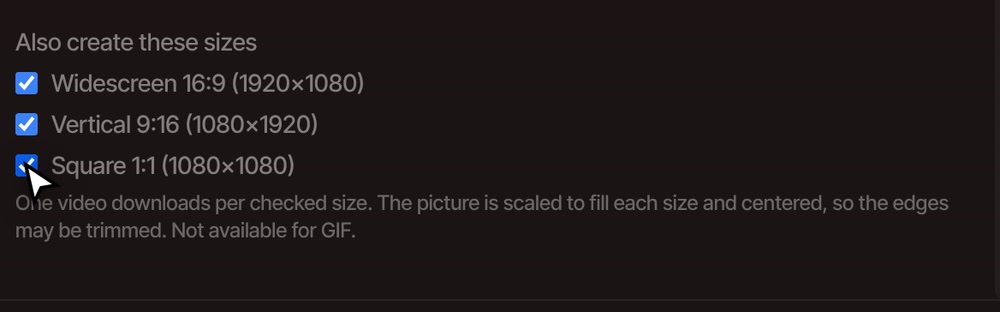
Tick the sizes you wantUnder Also create these sizes: Widescreen 16:9 (1920×1080), Vertical 9:16 (1080×1920) and Square 1:1 (1080×1080).
-
03
Click ExportOne video downloads for each box you ticked. If your browser asks about several downloads, allow them.
What to know
What happens to the picture.
-
Filled and centered
No black bars. The picture is scaled up to fill each size and kept centered, so a widescreen video turned vertical loses its left and right edges.
-
Set the project size
Open the Settings tab and type any width and height up to 7680 by 4320, or pick 1920x1080, 1280x720, 3840x2160 or 1080x1920. Everything you edit then follows that shape.
-
Move a clip yourself
Subject off to one side? Select the clip and change its size and position in Properties, then export. For an automatic version, try auto reframe.
Questions
Questions about resizing.
What size should I use for TikTok, Reels and Shorts?
Vertical 9:16 at 1080×1920. Tick Vertical 9:16 in the export window. Widescreen 16:9 suits YouTube, and Square 1:1 suits feed posts.
Will my video be cropped?
When the shape changes, yes. Each size is filled and centered, so the edges that do not fit are trimmed. If the subject is off to one side, move the clip before you export.
Are there limits on the extra sizes?
They are not available for GIF, and you cannot combine them with splitting at markers in the same export. The sizes are fixed at the three in the list. For another size, set it in Settings.
Is it free, and does it add a watermark?
It is free with no account, and exports have no watermark on any plan.
Does my video get uploaded?
No. Resizing and exporting happen on your own computer.
One video, every shape.
Free, no watermark, and your video never leaves your computer.