Free 4K video editor
Edit 4K video in your browser.
Yes, you can edit 4K here. Drop in 3840 × 2160 footage, cut it on a full timeline and export a 4K MP4 with no watermark. It is free, you do not need an account to start, and it all runs on your own computer.
- Free, no account
- No watermark
- Any length
How it works
Edit in 4K in three steps.
-
01
Drop your 4K clip onto the timeline.The editor asks “Match the project to this video?” Choose Match this video and the project becomes 3840 × 2160. If you skip it, the Settings tab has a 3840x2160 button and Apply Changes.
-
02
Edit it like any other video.Trim, split, add text and effects. While you work, a 4K project previews at 25% to keep playback smooth. The finished video is always drawn at full size.
-
03
Open File, then Export Video, and pick 4K.Set Resolution to 4K (3840x2160), keep the format on MP4 and click Export. The file is made on your computer and downloads when it is done.
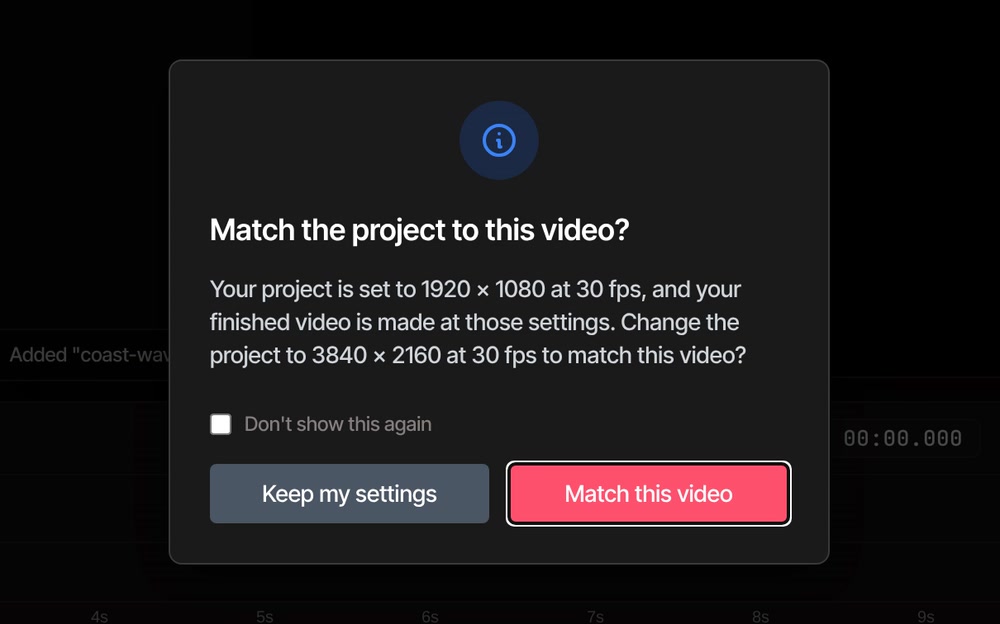
The 4K settings
What decides the size you get back.
-
The project sets the detail
The finished video is drawn at the project's size, then scaled to the Resolution you pick. A 1080p project exported as 4K is a 1080p picture stretched to fit. Original means the project's own size, which starts at 1920 × 1080.
-
Project sizes up to 8K
In the Settings tab, Width goes up to 7680, Height up to 4320 and Frame Rate up to 120. The 3840x2160 button sets 4K in one click, and Apply Changes makes it the project's size.
-
A one-click 4K preset
In the Presets tab of the export window, YouTube 4K sets 3840x2160, H.264, 30 fps and Maximum Quality. It still draws from the project's size, so set the project to 4K too.
-
Smaller copies from one edit
The same 4K project exports at 1440p, 1080p, 720p, 480p or 360p from the Resolution list. For vertical and square sizes, see resize video.
-
How big the file gets
At the default Quality of 80, a 4K export at 30 fps aims for about 30 megabits a second. Our 6-second test clip came out at about 22 MB, nearly 4 MB for every second. Lower Quality or export at 1440p to shrink it, or see compress video.
-
MP4 or WebM at 4K
Both are made by your browser's own encoder, which is the quick way and has no length limit. MP4 is the default, and WebM works at 4K too. H.265 and ProRes are a different story, covered in the questions below.
Your computer
Will your computer handle 4K?
It depends on the computer, because all the work happens on it. A 4K picture has four times the pixels of 1080p. Here is where you would feel that.
- Playing itYour browser plays 4K with your computer's video hardware where it can. H.264 files are the safest bet. 4K H.265 (HEVC) only plays well if your computer can decode it, and that varies from machine to machine.
- When it cannot play a fileIf your computer cannot decode a file's format, the editor falls back to a slower built-in decoder. It plays slowly, and it works at no more than about 1080p size, so that clip's 4K detail does not reach the export. For clips up to about 40 seconds at 4K, the editor offers a smooth copy when you import the file. The copy is slightly lower in quality.
- The lighter previewA 4K project previews at 25% until you choose otherwise. Preview Scale, above the monitor, goes from 10% to 100%. It only changes what you see while editing. The export is always drawn at full size.
- ExportingThe video is drawn frame by frame on your computer, so 4K takes longer than the same video at 1080p. Keep the tab open and the browser window visible while it runs. On Pro, the export window can make the video on our servers instead, so you can close the tab. Your footage is sent to your account first.
- Browser and screenChrome, Edge, Brave, Arc and Firefox all run VidTL well. Safari works for lighter editing, so use one of the others for 4K. You need a desktop or laptop: the editor does not run on phones.
Questions
Before you export 4K.
Is editing and exporting 4K really free?
Yes. Every plan, the free one included, edits and exports 4K with no watermark and no length limit, and you do not need an account to start. Pro adds the AI tools and cloud exports, which make the video on our servers. See pricing for the plans.
Why did my 4K video come out at 1080p?
The project was still 1920 × 1080, and Original in the export window means the project's own size. Say yes when the editor offers to match the project to your clip, or set 3840x2160 in the Settings tab and click Apply Changes, then export again. Picking 4K in Resolution on a 1080p project makes a 4K-sized file, but it only stretches the 1080p picture.
Can I export 8K?
As WebM, yes. When we tried it in October 2026, a 7680 × 4320 WebM exported fine. An 8K MP4 stopped with the message The export encoder failed: the browser could not make 8K MP4 itself, and the editor's built-in encoder ran out of memory at that size. Another computer may behave differently. To make an 8K video, set the project to 7680 × 4320 in the Settings tab and choose WebM. The Resolution list stops at 4K, so leave it on Original.
Can I export 4K as H.265 or ProRes?
Not reliably. Both go through the editor's slower built-in encoder, which has far less room to work in than your browser's own. In October 2026, a 4K H.265 export stopped with the message The export encoder failed, although H.265 at 1080p worked. ProRes is the slowest of the formats. For 4K, use MP4 or WebM, and see video converter for other formats at smaller sizes.
Is my 4K footage uploaded anywhere?
No. Editing and exporting happen on your computer. Footage leaves it only if you save to cloud storage or use something that runs on our servers, such as a Pro cloud export.
How long can a 4K video be?
There is no length limit on any plan. A longer 4K video takes longer to export and makes a bigger file, so check that your drive has room. If it runs out, the editor stops and tells you to free up some space.
Can I edit 4K on a phone or tablet?
No. The editor needs a desktop or laptop computer, and on a phone it shows Desktop computer required. Copy the footage to your computer and open the editor there.
Your footage, full size.
Drop in a 4K clip, say yes to Match this video and export it at the size it was shot. No account, no watermark.