Skip to content

AI music generator · Part of Pro

Describe the mood. Get a song for your video.

Type what the music should feel like and how long it can run. VidTL writes an original track and drops it on its own audio track under your video, ready to trim, fade and mix.

  • Pro and Studio plans
  • Songs up to 5 minutes
  • With or without vocals
One description typed in, one real track made, placed under the video. The wait is sped up. The video here is silent, so listen to the track below.

How it works

From a sentence to a track on your timeline.

  1. 01

    Open Generate MusicIn the editor, choose Tools, then Generate Music.

  2. 02

    Describe the musicMood, instruments, tempo and genre. The more you say, the closer it lands.

  3. 03

    Pick the type and the longest lengthA full song or quick background music. Add lyrics if you want singing.

  4. 04

    Press Generate and keep editingProgress shows in the status line. The finished track goes into your library and onto an audio track.

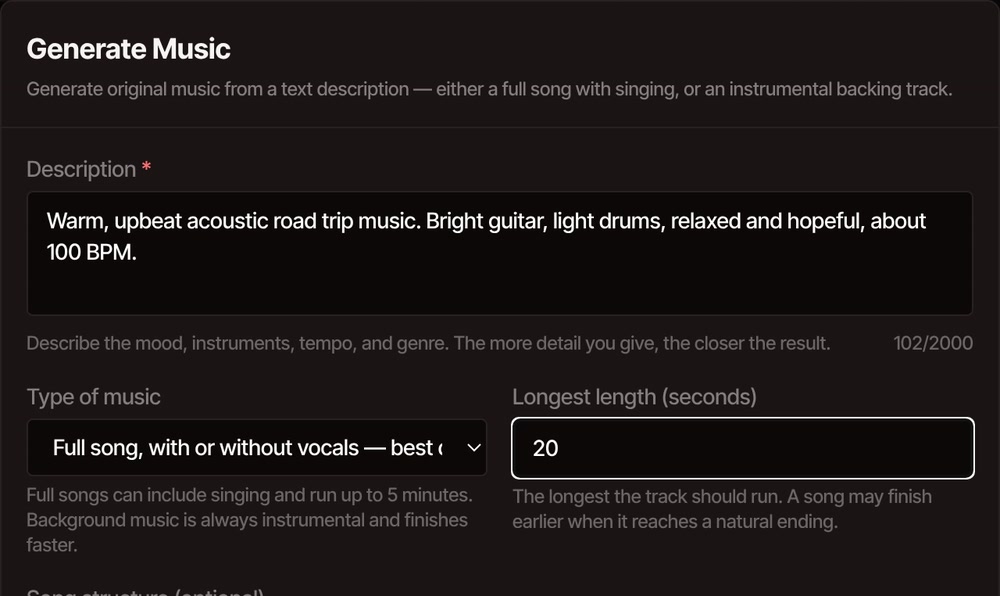
The Generate Music window with a description of warm, upbeat acoustic road trip music typed in, a type of music to choose and a longest length of 20 seconds, above the optional song layout.

Listen for yourself

The track from the video, exactly as it came out.

Made in one go from this description

“Warm, upbeat acoustic road trip music. Bright guitar, light drums, relaxed and hopeful, about 100 BPM.”

The first try, with no lyrics and no editing afterwards. If it isn't right, change a few words and generate again.

What you control

Music that fits the video, not a track you settle for.

  • A song or a background bed

    A full song can run up to 5 minutes, with or without vocals. Background music is always instrumental, finishes faster and runs up to 2 minutes. One background option follows the melody of an audio file you give it.

  • Your own lyrics

    Lay a song out in sections: intro, verse, chorus, bridge, instrumental, solo, outro. Any words you write under a section get sung. Sections with no words stay instrumental. Leave it empty and the arrangement is built for you.

  • Lands where you need it

    The track is saved in a Generated Music folder in your library and placed on an audio track at the playhead, so there is nothing to download or import. You can undo it if you change your mind.

  • A length you choose

    You set the longest the track can run. A song ends when its arrangement ends, so it can finish a little early. Adding sections to a song makes it longer.

  • Or just ask the assistant

    Tell the AI video editing assistant you want upbeat music under the video and it can write the track and place it for you.

  • Cut the video to the beat

    Once the track is on the timeline, sync your clips to its beat so every cut lands on a drum hit or a vocal entry.

What you can do with it

VidTL’s terms say you keep ownership of what you generate, so the music is yours to use in your videos.

Ownership is “subject to any rights owned by others”, and AI music can occasionally sound like something that already exists. Listen to the whole track before you publish, and don’t ask for a particular artist’s song. You are responsible for checking what you publish, and some platforms have their own rules for AI-made audio. The details are in the terms.

Pricing

Start free. Upgrade for the AI.

Every plan edits videos of any length and exports without a watermark. Pro adds the AI assistant that does the editing for you. Cancel anytime.

Hobby

For first videos and weekend projects.

$0forever

No card needed

Start free

AI credits each weekNone

  • Unlimited video length
  • No watermark, exports up to 8K
  • Edit video by editing text
  • Automatic captions
  • Background removal
  • 5 GB of cloud storage
  • Not included: AI assistant
  • Not included: Voiceovers from text
  • Not included: AI music and video
  • Not included: Cloud exports
Most popular

Pro

For creators who publish every week.

$29$23/ month

billed yearly, $276 a year

Go Pro

AI credits each week1×

Everything in Hobby, plus:

  • AI assistant that edits for you
  • Automatic rough cuts
  • Voiceovers from text, even in your own voice
  • AI music and video
  • Faster captions and background removal
  • Cloud exports, so you can close the tab
  • 100 GB of cloud storage

Studio

Best value

For studios and anyone publishing every day.

$99$79/ month

billed yearly, $948 a year

Get Studio

AI credits each week5×

Everything in Pro, plus:

  • 5×AI credits, refilled every week
  • 5×AI edits and rough cuts
  • 5×Voiceovers, in any voice
  • 5×AI music and video clips
  • 5×Fast captions and background removal
  • 1 TB of cloud storage

Prices in US dollars. Yearly plans are billed once a year.

Questions

About AI music.

Is the AI music generator free?

No, it is part of the Pro and Studio plans, and each track uses some of your weekly AI credits. The free plan still gives you the full editor with no watermark, and you can import any music you already have and put it under your video. See plans for what each one includes.

How long does a track take to make?

A 20-second song took a little under five minutes when we recorded the demo above, at a busy time on our servers. Longer songs take longer. Progress shows in the status line. Keep the editor tab open until the track appears, because that is when it is added to your project.

Can it write a song with vocals?

Yes. Choose the full song type, then write your words under a section such as verse or chorus and they are sung. Describe the voice you want in the description, for example soft female vocals. Leave the lyrics empty for an instrumental.

How long can the music be?

A full song can run up to 5 minutes and background music up to 2 minutes. For a longer video, put two tracks back to back or loop one on the timeline.

Can I use the music in videos I post?

VidTL’s terms say you keep ownership of what you generate, so you can use it in your own videos. You are still the one who checks the result before it goes out, and ownership is subject to the rights of others. The section above says more.

Give your video a soundtrack.

Describe it, generate it, and it is already on your timeline.