AI highlight reel maker
Turn a long video into its best moments.
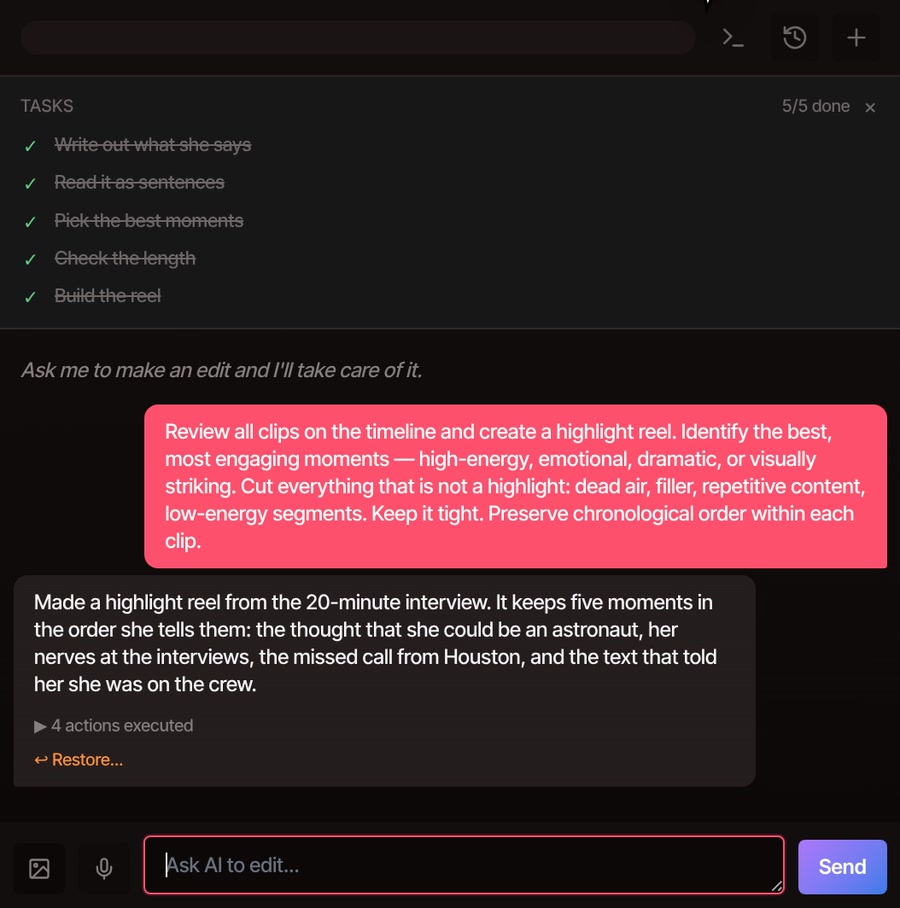
Put your recording on the timeline, open the AI Prompts menu and click Highlight Reel. The AI assistant picks the strongest moments, plays them back to back in the order they happened, and cuts the rest.
- Part of Pro
- Nothing to install
- Undo in one step
How it works
One menu click, then the AI takes over.
-
01
Put your long video on the timelineOne recording or several. The AI looks at every clip on the timeline.
-
02
Open AI Prompts and click Highlight ReelIt sends the assistant a ready-made request and opens the AI tab, so you can watch it work.
-
03
Let it read and pickIt writes out what was said if that has not been done yet, reads it as numbered sentences, chooses the moments to keep and checks the length before it builds anything.
-
04
Play it, then ask for changesWant it shorter, or only the parts about one subject? Ask in the same chat, in plain words.
What you get
A long recording becomes a short, ordinary edit.
The reel is made of real clips on your timeline, not a flattened video. Moments that sat next to each other in the recording play as one clip, so a reel of a few pieces sounds like a person talking, not like a montage. Captions follow every piece.


What it keeps
The moments worth keeping, in the order they happened.
-
The best moments
The request asks for the most engaging parts: high-energy, emotional, dramatic or visually striking. The AI decides what that means in your footage, so two tries can give different reels.
-
Cuts the clutter
Dead air, filler, repeated points and low-energy stretches are left out. Whatever it keeps stays in the order it was recorded.
-
Whole thoughts
On talking footage it keeps complete sentences and the sentences their meaning depends on. It never rewrites what anyone said.
-
Captions come along
Writing out what was said gives you captions on the timeline, and they move with every piece. Hide the captions row if you do not want them.
-
Ask for a different reel
The menu item sends one standard request. Type your own in the AI tab for a set length or a subject, such as “about 60 seconds on how she joined NASA.”
-
Easy to take back
The reel is one undo step, and the assistant’s reply has a Restore link. Your original recording stays untouched in the media library.
Part of Pro
Highlight reels come with the AI assistant, which is part of Pro and Studio.
The free plan still gives you the whole editor, with no watermark and no limit on video length. You can pick the moments yourself: read the transcript and delete what you do not want, and the video cuts with it. That takes longer on a long recording, but it works with a free account with a confirmed email. Edit video by text shows how.
See plansQuestions
Before you click it.
What kind of video does it work on?
It works best on footage of people talking, such as interviews, talks, podcasts and meetings, because the AI picks moments by reading what was said. The demo uses a 20-minute interview.
How long can the video be?
There is no limit on video length in the editor. The AI can read about two hours of speech in one go. For longer projects, ask it to start with some of the recordings.
How long does it take?
Writing out what was said is the slow part. It took between one and three minutes for the 20-minute interview in the demo, and it takes longer when the servers are busy. Choosing the moments and building the reel is much quicker. If the video already has captions, the AI starts from those.
Does it send my video anywhere?
Your video files stay on your computer and the reel is built there. Writing out what was said runs on VidTL’s servers, so the sound of the recording goes there for that step. The assistant then works from the text, not your video.
Can I choose the length or the subject?
Yes. The Highlight Reel menu item sends the same request every time. To steer it, type your own in the AI tab, such as “make a 45 second reel of the funniest moments.” You can keep asking for changes after the first reel.
Can I fix the reel by hand?
Yes. Everything lands on your timeline as ordinary clips. Trim them, move them, delete one you do not like, or undo the whole thing.
Also in the editor
- AI rough cut Ask for a story and a length, and it keeps the sentences that tell it.
- AI video editing assistant Everything else you can ask it for, from captions to titles.
- Edit video by text Cut the moments yourself by deleting words from the transcript.
- Remove filler words Tidy the moments you kept, taking out ums, ahs and restarts.
- Auto caption generator Captions for the reel, timed word by word.
- Plans and pricing See what comes with Pro and Studio.
Skip the scrubbing. Get the highlights.
The editor opens in your browser with nothing to install. Highlight reels come with Pro.