AI rough cut
Rough cut an interview with one request.
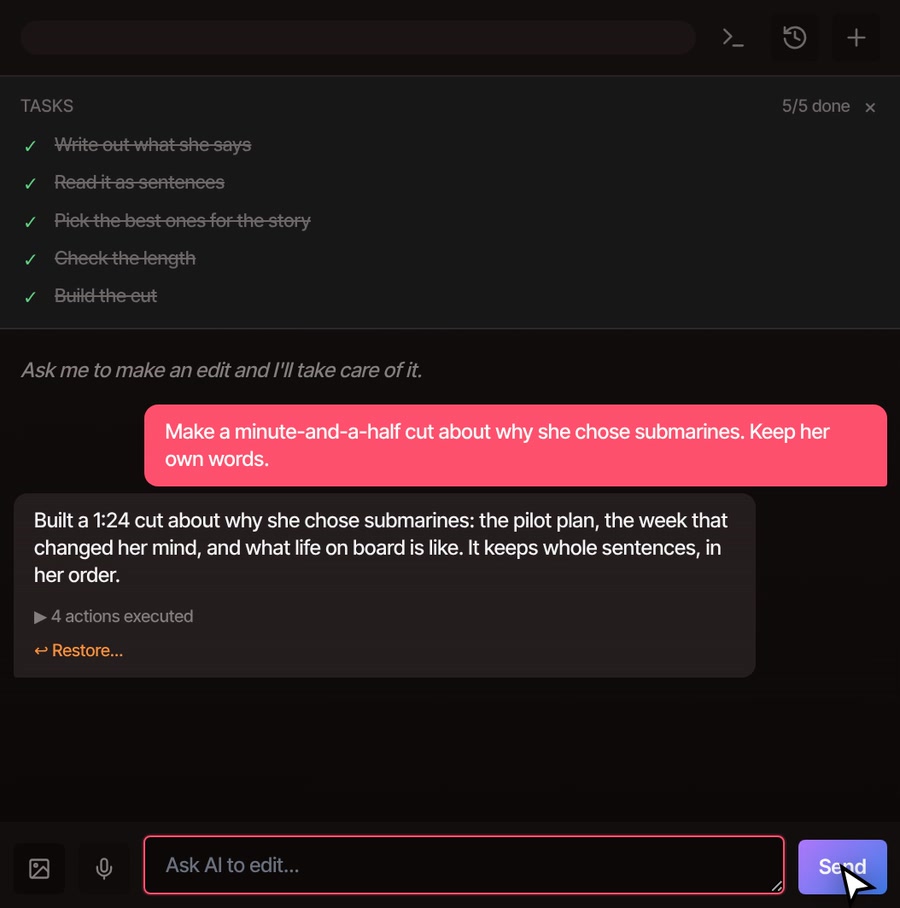
Tell the AI assistant the story you want and how long it should run. It reads what was said, keeps your best whole sentences in the order that tells it, and builds the cut on your timeline. Then ask for changes the way you would tell an editor.
- Part of Pro
- Whole sentences, never rewritten
- One undo
How it works
Ask for the story. Check the cut.
-
01
Put your recordings on the timelineOne interview or several. The AI works from the original files, so nothing is lost from them.
-
02
Say what you wantName the story, the length and the order, like “a three-minute cut about how she became an astronaut.” Open the AI tab on the right of the editor and type it.
-
03
Let it read and pickIt writes out what was said if that has not been done yet, reads it as numbered sentences, chooses the ones to keep and checks the length before it builds anything.
-
04
Play it, then ask for changesAsk for a part back, a different order or a longer cut. It builds a fresh cut from your recordings each time, so nothing you left out is gone for good.
What you get
A long talk becomes a short, ordinary edit.
The cut is made of real clips on your timeline. Where two sentences were next to each other in the recording they play as one clip with their natural pauses, so a cut of a few pieces sounds like someone talking, not like a montage. Captions follow every piece.


What it keeps
Your best sentences, in the right order.
-
Whole thoughts only
It picks complete sentences and the sentences their meaning depends on. It never rewrites what anyone said, and it checks for sentences that stop halfway before it builds.
-
Your story, your order
Ask for the order you want, not the order it was recorded in. With several recordings it can move between them, and between people, as the story does.
-
Leaves out the clutter
When VidTL can tell two voices apart in a recording, it leaves the interviewer out unless you ask for them. Retakes, off-topic chatter and talk about the recording itself stay out too.
-
Hits the length you ask for
Say “about four minutes” and it checks the total before building, aiming to land close to what you asked for. Ask for a longer or shorter cut and it builds a new one.
-
Smooth joins
Choose a tight, natural or relaxed pace for the breathing room around each cut. A silence longer than a second and a half is cut out, even inside a run of sentences.
-
Easy to take back
The whole cut is one undo step, and the reply has a Restore link. Your original recordings stay in the media library, untouched.
Part of Pro
Rough cuts come with the AI assistant, which is part of Pro and Studio.
The free plan still gives you the whole editor with no watermark. You can read a transcript and delete the sentences you don't want, and the video cuts with them. That is slower on a long interview, but it works with a free account with a confirmed email. Edit video by text shows how.
See plansQuestions
Before you hand it the cut.
How long can the interview be?
The tutorial cuts a 20-minute interview to three minutes. The AI can read about two hours of interview in one go, and past that it reads a few recordings at a time. Very long projects work best when you tell it which recordings to start with.
Does it send my video anywhere?
Your video files stay on your computer and the cut is built there. Writing out what was said is a job that runs on VidTL's servers, so the sound of the recording goes there for that step. The assistant then works from the text of what was said, not your video.
What if it misheard a word?
The AI chooses by what the transcript says, so fix a wrong name or term in the transcript first, then ask again. A badly misheard sentence is the one it could skip, so give the transcript a quick read before you ask.
Can I make the cut longer, shorter or different?
Yes, and you do not need to undo anything. Ask in plain words, such as “bring back the part about her dad” or “let her finish her thoughts.” Each answer is a new cut built from the full recordings.
Is this the same as removing filler words?
No. A rough cut chooses which sentences to keep. Removing filler words tidies the ones you keep, and it is a separate request.
Keep going
- Rough cut an interview Watch a 20-minute interview become a three-minute story, step by step.
- Edit by text Cut it yourself by deleting words from the transcript. The video cuts with them.
- Remove filler words Tidy the sentences you kept, taking out ums, ahs and restarts.
- AI highlight reel Pull the best moments of a long recording together, back to back.
- The AI video editing assistant Everything else you can ask it for, from captions to titles.
- Plans and pricing See what comes with Pro and Studio.
Tell it the story. Then press play.
The editor opens in your browser with nothing to install. Rough cuts come with Pro.