AI motion graphics
Describe the title. Watch it animate.
Tell VidTL's AI assistant what you want to see: an animated title, a name tag, a card or a 3D logo reveal. It builds the graphic over your video as separate layers you can retype, recolour and retime.
- AI part of Pro
- Templates free
- No watermark
How it works
Say it in a sentence. Get a graphic.
-
01
Open the AI panelBring your footage in, then click the AI tab on the right of the editor.
-
02
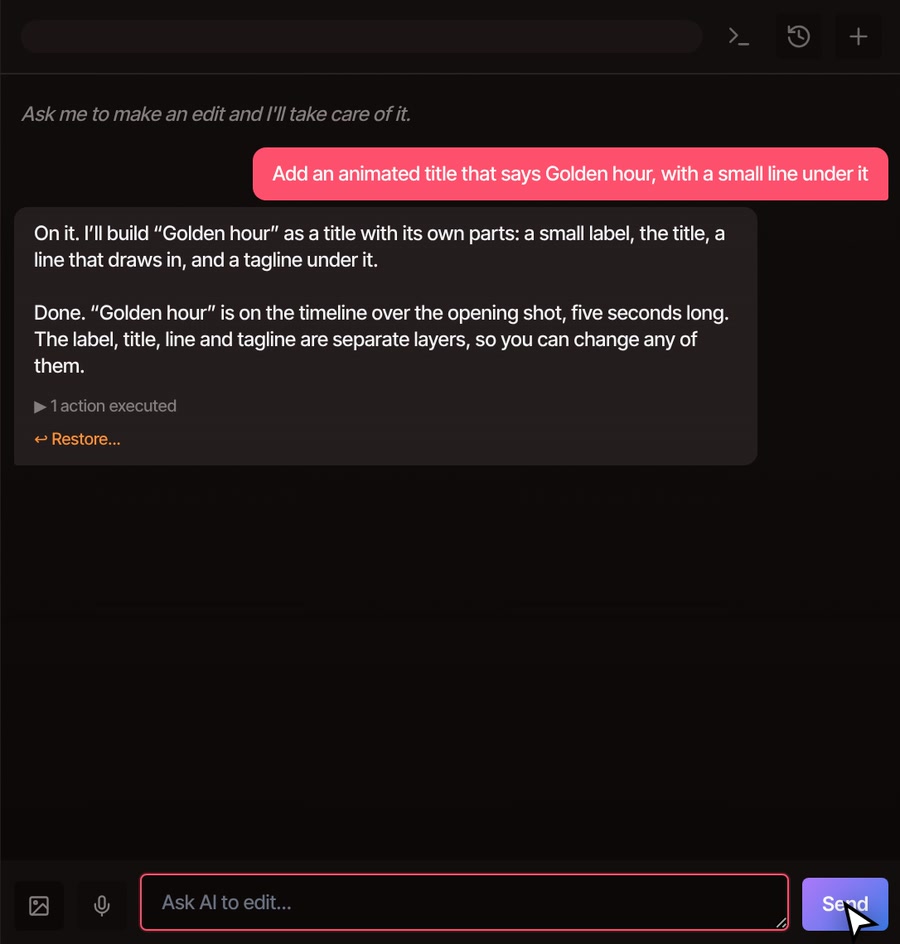
Describe the graphicGive the words, where they go and the feel, like “a bold title at the start” or “a name tag for Maya, lower left, calm and warm”.
-
03
Watch it landThe graphic is added on its own track above your video. Press play to see it move.
-
04
Ask for changesSay what to change, such as “make the title amber”. It changes that one layer and leaves the rest alone.
What you can ask for
If you can describe it, it can try to build it.
-
Titles and intros
Big serif or bold poster titles with a staged entrance: bars that slide in, words that reveal, a line that draws under them. It starts from one of the editor's ready-made looks, from clean and light to dark and editorial, then follows your colours and any Google Fonts typeface you name.
-
Name tags and lower thirds
A name and role that slide in beside a speaker. The assistant is told to keep graphics clear of faces, and you can drag the result wherever it suits the shot.
-
Cards, stats and end screens
A big number, a quote card, a step banner, a subscribe reminder. Ask for charts or app-style cards too, and say how long each should stay on screen.
-
3D logo reveals
Import your logo as a picture and ask for a reveal. It can fly in as pieces and lock together into a solid 3D logo, with a camera that moves around it, glow, sparks and 3D lettering for your tagline.
Still editable
It is not a flat video. Every part is a layer.
-
Retype it
Double-click the words in the preview and type new ones. The label, the title and the tagline are each their own piece of text.
-
Retime it
Double-click the graphic on the timeline to open its layers. Each one has its own bar. Drag a point to move when something happens, or add a ready-made motion like Fade in, Rise up, Pop in, Pulse or Fade out.
-
Ask again
Say “make the title amber” and only that layer changes. Undo works on the assistant’s changes like your own, and Restore on a reply puts the project back as it was.

Part of Pro
Pro and Studio add the AI assistant that designs the graphic from your description.
The free plan still has the gallery of ready-made motion graphics templates: titles, name tags, callouts, cards and end screens. Click one to add it at the playhead, then change its words and motion yourself. No plan adds a watermark.
See plansQuestions
Before you try it.
Do I need to know animation or code?
No. You describe the graphic in plain words and the editor does the animating. To adjust it afterwards you click and drag, or ask the assistant to change it.
Can it use my brand colours and fonts?
Yes. Give it your colour codes and name a typeface from Google Fonts, and say it again if something comes out off-brand. You can also change any layer’s colour and font by hand.
How does the 3D logo reveal work?
You import your logo as a picture, ideally a PNG with a transparent background, and ask for a reveal. The assistant writes a 3D scene around it and the editor draws it frame by frame, with motion blur and glow. Models made in other 3D programs cannot be imported, and heavy scenes export more slowly on a computer without a graphics card.
Will the graphic cover someone’s face?
The assistant is told to keep graphics clear of faces and hands, usually by anchoring them to a corner or the lower third. Check the preview, and drag the graphic if the shot needs it somewhere else.
Is my video uploaded?
Your video files stay on your computer, and the edits are made there. The assistant itself runs on VidTL’s servers. It works from a description of your project and takes a still frame when it needs to see the picture.
Can I export the graphic on its own?
Yes. Export as WebM and turn on Transparent background, and empty areas of the picture stay clear so you can lay the graphic over footage in another editor. The same graphic is also drawn into any normal video export.
Keep going
- Motion graphics templates Prefer to pick a design and type your own words? The gallery is free.
- AI video editing assistant Everything else you can ask the assistant to do, from cuts to captions.
- Add text to video Plain text over a shot, when you do not need the animation.
- Keyframe animation Animate size, position and more by hand on any clip.
- Website promo video A ready-made 3D promo film made from your own website.
Say what it should say. Watch it move.
The editor opens in your browser with nothing to install. The AI assistant comes with Pro, and the ready-made titles are free.