Free text for video
Add text to video online. Just click and type.
Pick the Text tool, click where the words should go and type them. Then change the font, size and color, or start from a ready-made title or name tag. It runs in your browser, and the finished video has no watermark.
- No account to start
- No watermark
- Your video stays on your computer
How it works
Click, type, then make it yours.
-
01
Pick the Text tool.Press T, or click the T button above the timeline.
-
02
Click the picture and type.Click where the words should go. A box opens: type your text and press OK. It shows up there for three seconds, on a Text track of its own.
-
03
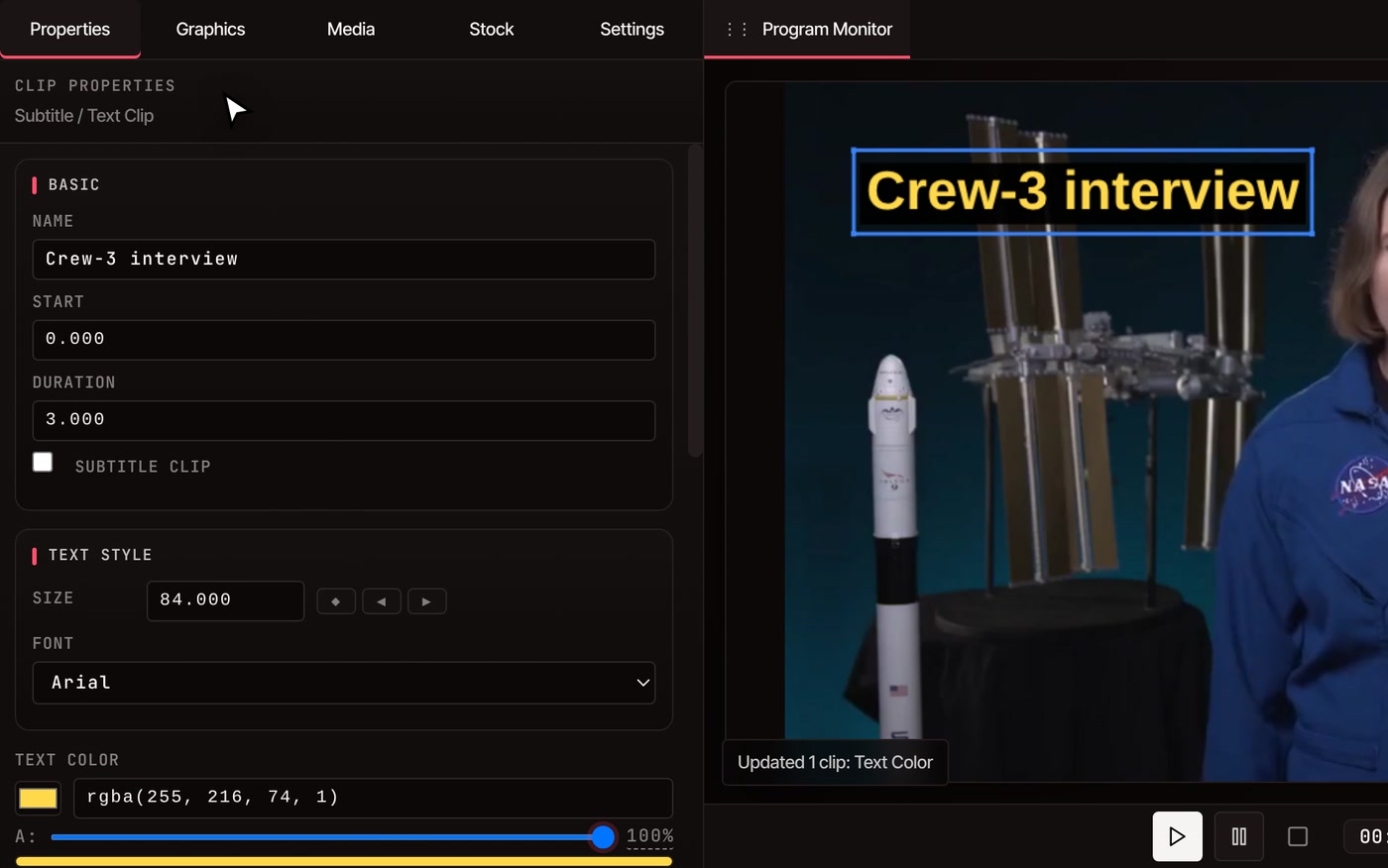
Style it in Properties.Change Size, Font, Text Color, Background Color and Alignment. Drag the text on the picture to move it.
-
04
Set how long it stays.Drag the ends of the text clip on the timeline, or type a Start and a Duration in Properties.
What you can change
Make the text look like yours.
-
Fonts and size
Six standard fonts (Arial, Helvetica, Times, Georgia, Courier and Impact) and eleven handwriting styles. Size runs from 8 to 200. You can’t add your own font files yet.
-
Color and background
Text color and background color each have a transparency slider. New text sits on a dark box so it reads over any footage. Slide the background to 0% for plain letters.
-
Place it and time it
Drag text anywhere on the picture, or type exact X and Y numbers. Align it left, center or right. Drag the ends of its clip to change when it appears and when it goes.
-
Writing animation
Open the Effects tab and add Writing Animation from the Text group. The words are drawn stroke by stroke like handwriting, over 0.5 to 10 seconds. It switches the text to a handwriting font.
-
Fade in and out
Drag Fade In or Fade Out from the Transitions tab onto a text clip. Drop it on the left half of the clip to fade at its start, or the right half to fade at its end.
-
Match several texts
Style one text, then use Copy to All in Properties to give every other text its font, size, colors and alignment. Captions are text too, so they change with the rest.
Ready-made designs
Start from a design instead of a blank box.
Need a name tag, often called a lower third? Open the Graphics tab and click a design to add it at the playhead. Double-click its words on the picture to retype them. Colors, fonts, timing and motion can all be changed afterwards.
See the motion graphics templates-
Titles
Big Bold Title, Elegant Title
-
Name tags
Name Tag Card, Name Tag Bar
-
Callouts
Pointing Arrow, Highlight Circle, Keyboard Shortcut
-
Cards
Big Number, Quote, Step Banner
-
End screens
Thanks For Watching, Subscribe Reminder
Questions
Adding text, answered.
Is adding text to a video free?
Yes. The Text tool, every style option and the ready-made designs are free, and you don’t need an account to start. The finished video has no watermark, goes up to 8K and can be any length.
Is the text part of the exported video?
Yes. When you export, the text is drawn into the picture along with everything else. Until then it is a separate clip you can edit, move or delete, and your original video file is never changed.
How long does text stay on screen?
Three seconds to start with, beginning at the playhead. Drag either end of the text clip on the timeline to change it, or type a Start and a Duration in Properties.
Can I put two lines of text in one box?
Each text holds one line. Add a second text under it for a second line. The name tag designs already have two lines, a name and a role, and you retype each one.
Can I use my own font?
Not yet. You can pick from six standard fonts and eleven handwriting styles. Impact works well for bold titles, and the handwriting styles pair with the Writing Animation effect.
How do I add captions for everything someone says?
Typing text suits titles and short lines. For every spoken word, use the auto caption generator, which writes the captions and times them to the speech. It needs a free account.
Can I add text to a video on my phone?
Not today. The editor needs a desktop or laptop computer. Chrome, Edge, Brave, Arc and Firefox all run it well, and Safari works for lighter editing.
After the text
- Auto caption generator Captions for everything said, timed to the speech.
- Word-by-word captions Big captions that come up one word at a time.
- Motion graphics templates More animated titles, callouts and end screens.
- Keyframe animation Make your text move, grow or fade on cue.
- Resize video Fit the finished video to TikTok, Reels or YouTube.
- Online video editor Everything else the editor does, from the same timeline.
Put words on your video.
Open the editor, pick the Text tool and click the picture. No account, no watermark, nothing to install.