Free in the editor
Motion graphics templates, retyped.
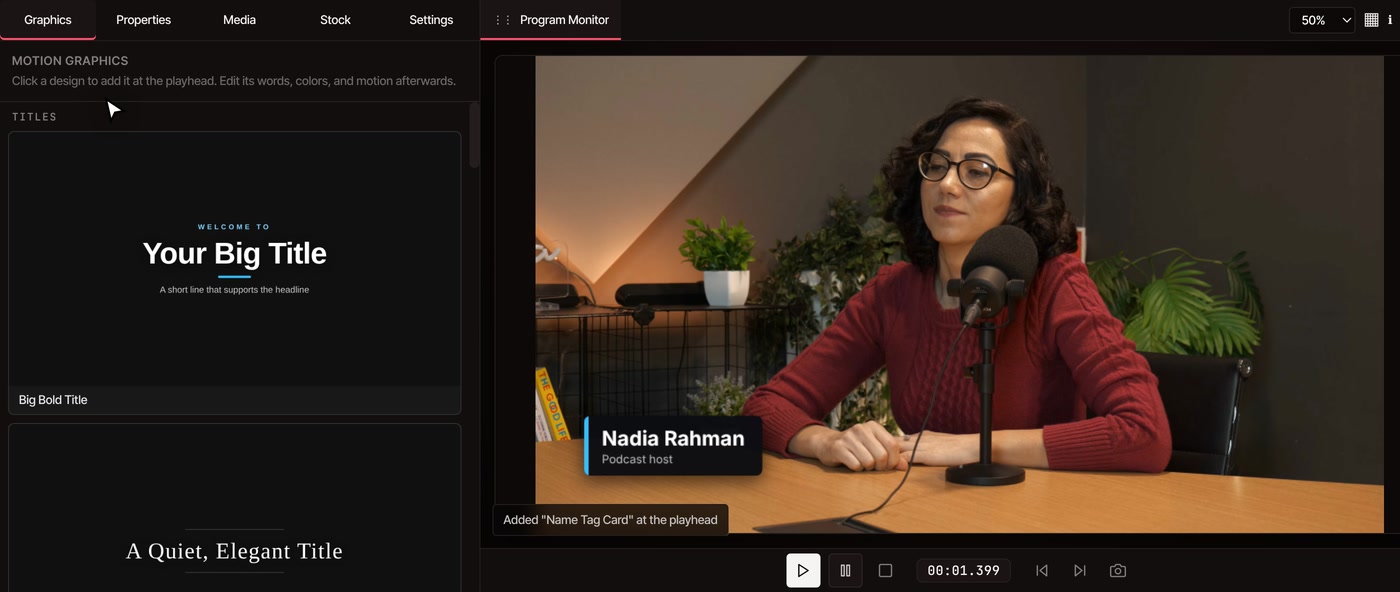
Open the Graphics tab and click a title, name tag, callout, card or end screen. It lands on your timeline already animated. Double-click the words to make them yours.
- No watermark
- 12 ready-made designs
- Nothing to install
How it works
Click a design, then make it yours.
-
01
Pick a design in GraphicsIt sits in the left sidebar next to Media, Stock and Settings. One click adds it at the playhead as a clip on the timeline.
-
02
Retype the wordsDouble-click the text on the preview and type. Or select a layer in Properties to change its text, text color, size, font and background.
-
03
Set the timing and motionChange the clip’s start and duration, or double-click it on the timeline to open its layers. Each layer can appear, grab attention or leave in a style you pick.
What’s in the gallery
Twelve designs, five kinds.
-
Titles
Big Bold Title puts a headline with a small line above and below it in the middle of the picture. Elegant Title sets a serif headline between two thin lines.
-
Name tags
Name Tag Card is a dark panel with an accent edge. Name Tag Bar is bare white text over a short colored line. Both slide in at the lower left with a name and a role.
-
Callouts
Pointing Arrow bounces next to your label. Highlight Circle rings something on screen. Keyboard Shortcut draws keys such as Ctrl + S.
-
Cards
Big Number shows one stat with a caption. Quote sets a quotation with its author. Step Banner numbers a step for a tutorial.
-
End screens
Thanks For Watching and Subscribe Reminder fill the picture with a closing message. The reminder adds a button-style call to action.
-
Something that isn’t here
Describe the graphic you want to the AI assistant and it builds one on your timeline. That part is AI motion graphics, part of Pro.
Questions
Before you try it.
Are the motion graphics templates free?
Yes. The gallery, the editing and the export are free, with no watermark, and you can start without an account. Only the AI assistant, which can design a new graphic from a typed request, needs a Pro plan.
Can I use my own templates from After Effects or Premiere Pro?
No. VidTL can’t open those template files. You get the twelve designs in the gallery, which you can restyle freely, plus anything the AI assistant builds for you on Pro.
How long does a graphic stay on screen?
Every design is 4 or 5 seconds long when you add it. You can change its duration in Properties. The motion is timed to the original length, so after stretching one, play it back to check how it enters and leaves.
Do the graphics show up in the exported video?
Yes. They are drawn into the video when you export, exactly as they look in the preview.
Also in the editor
- Add text to video Type your own text straight onto the picture instead of using a design.
- Keyframe animation Animate any clip or layer yourself, point by point.
- AI motion graphics Ask the assistant for a graphic the gallery doesn’t have.
- Word by word captions Captions that light up as each word is spoken.
- Video transitions Fades, zooms and slides between clips.
- Online video editor The whole editor these graphics live in.
Titles and name tags ready in a minute.
Add your footage, open Graphics and click a design. No watermark on what you export.