CLI + MCP guide
Video Editor MCP and CLI: Edit Video From Your Terminal With Claude Code
VidTL ships a video editor CLI that hands an AI coding agent the same tool access an MCP server would. Download one file, export your access key, switch on agent control in the editor, and Claude Code edits the timeline you have open. 12 tool groups, 122 operations, no config file to write.
What the VidTL video editor CLI does
The connector is a single Node file called vidtl.mjs. It is about 14KB and installs nothing alongside itself. Your agent runs it as a command. Each run sends one instruction to the editor tab you have open in your browser and prints the editor's answer back as JSON.
That is the same job an MCP server does: publish a list of tools, describe what each one takes, and run them on request. The difference is delivery. There is no MCP server process to keep alive and no agent config to register it in. Your agent shells out to a file sitting in your working directory, which every coding agent can already do. The whole thing runs from the command line, and the editor never leaves your browser tab.
You watch it happen. Clips disappear, captions appear, graphics land on the canvas. Every call that changes the project is written to the editor's history, so undo takes back an agent's edit the same way it takes back yours.
At a glance
The CLI in numbers
- 12 tool groups
- 122 operations across them
- 9 commands to learn
- 0 dependencies to install
- 15 min ceiling on one call
Needs Node 18 or newer and a Pro or Studio plan.
Pre-flight
Before you start
- A Pro or Studio plan. Agent control is a paid feature. The CLI returns a 403 on the free plan. See plans.
- Node 18 or newer. Check with
node -v. The CLI uses the built-in fetch, which arrived in 18. - An agent that runs commands. Claude Code, or anything else that can execute a shell command and read its output.
- One editor tab. One tab holds the connection. Opening a second and switching control there moves it, and the first tab stops taking calls.
Setup
Set up the CLI and connect your agent
Six steps, done once. The labels below match what is on screen in the editor.
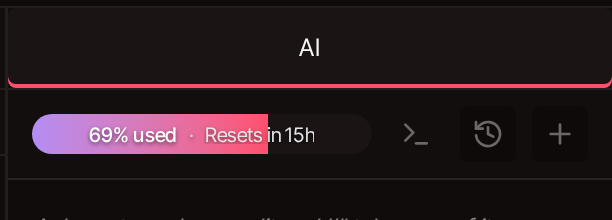
1. Open the terminal icon in the AI panel
Open your project and switch the right-hand panel to AI. The terminal icon in the row above the chat box opens Connect a coding agent.
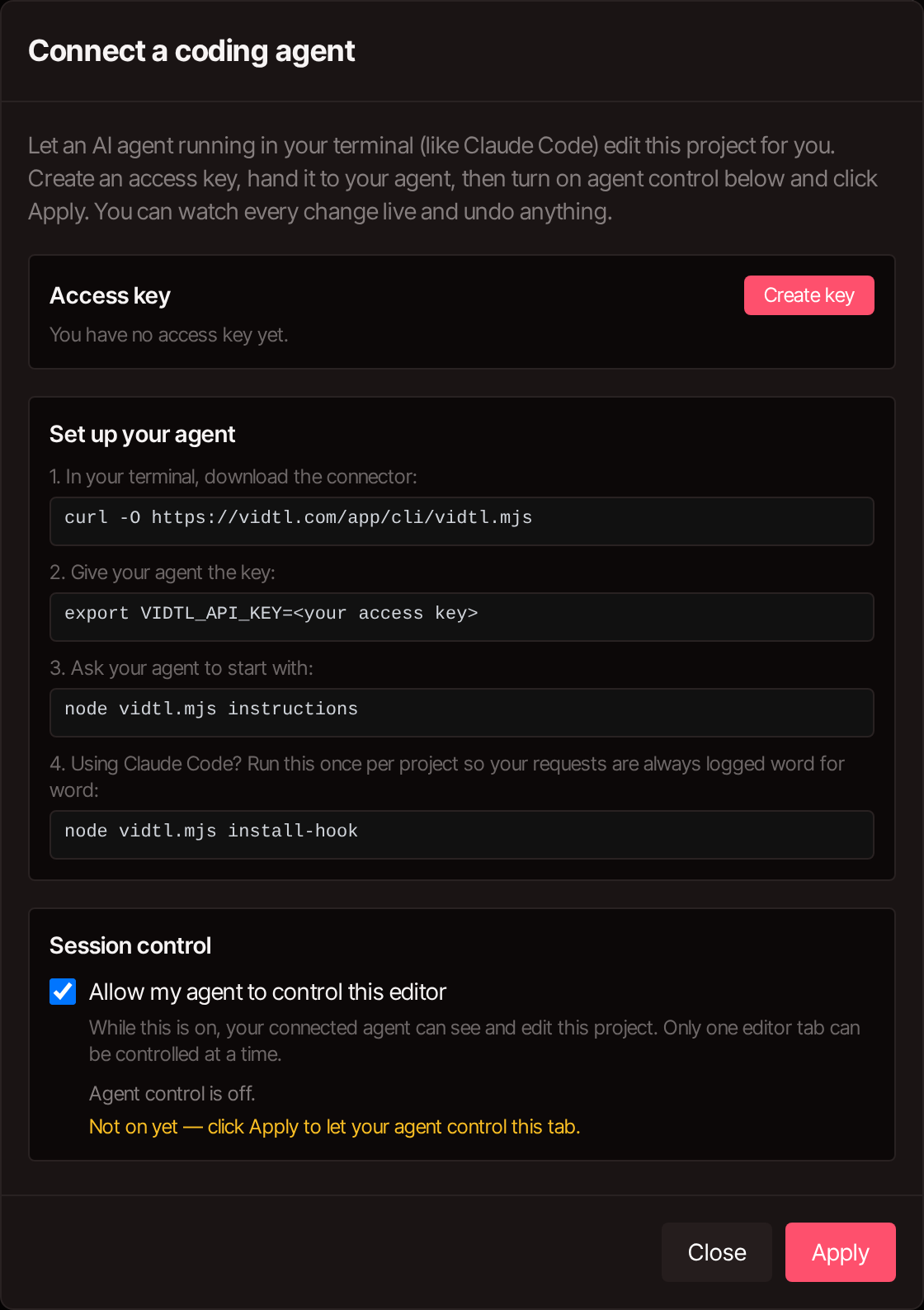
2. Create your access key
Click Create key. Keys start with vidtl_ and are shown once, so copy it now. One key covers your account: Replace key deletes the old one on the spot, and Revoke deletes it without issuing a new one.
3. Download the CLI and export the key
Run both in the folder you work from. The first downloads vidtl.mjs; the second is how the CLI authenticates every request.
Set VIDTL_AGENT as well if you want a particular name in the editor's status bar. Claude Code is detected and named on its own.
4. Switch on agent control and click Apply
Under Session control, tick Allow my agent to control this editor and click Apply. The line underneath reads Waiting for your agent… and then names your agent once it calls in.
This switch is the permission boundary. With it off, a valid key gets told no editor session is connected, and no edit reaches your project.
5. Point the agent at the CLI instructions
Ask your agent to run the first command. It prints the guide written for agents: how the timeline is addressed, the tool list, and how to check its own work. Then it can confirm a tab is listening.
6. Ask for the edit in plain English
Describe the result. The agent reads the project with state, makes the changes with call, and reports what it did. Watch the timeline while it runs.
Ask for one outcome per request. Batched requests are harder to review, and harder to unpick when one part of them is wrong.
The MCP question
Is this an MCP server for video editing?
It does the job people want a video editing MCP server for, packaged differently. Both approaches expose a tool list with typed arguments and run the calls an agent makes against them. VidTL's is a CLI rather than a long-running MCP server, so there is nothing to add to an MCP config file and nothing to restart when the tools change.
Three practical consequences. Any agent that can run a shell command works, not only MCP clients. The tool list is fetched live with node vidtl.mjs tools, so it cannot drift from the editor you are connected to. And because each call is a process that exits, a stuck call costs you one command instead of a hung server.
Claude Code
Forward your prompts automatically
Several editor features read your request in your own words rather than your agent's paraphrase of it. Run this once per project and Claude Code sends it for you from the next session on.
It writes a prompt hook into .claude/settings.local.json. Hooks load at session start, so send the current request by hand with node vidtl.mjs prompt "…" and let the hook cover the rest. Sending it both ways delivers it twice.
Command reference
Every CLI command
Nine commands. Your agent runs them itself once it has read the instructions. These are what you ask for by name when an edit goes sideways.
| Command | What it returns | When to use it |
|---|---|---|
| instructions | The agent guide, with the tool list inlined | First command of a fresh session. |
| status | Whether a tab is connected, and which account | Run it first whenever a call fails. Usually it is the tab, not the command. |
| state | Project settings, clips, media, transcript, selection, playhead | Before editing, and again after cuts or moves, since timings shift. |
| tools | Full argument schema for all 122 operations | When the agent needs the exact shape of one call. |
| prompt "…" | Nothing. It logs your words | Sends your request verbatim. Pipe long text with prompt -. |
| screenshot 12.5 | A .jpg path on disk | Every track composited at that second, exactly as it will export. How the agent checks its own work. |
| upload clip.mp4 | A fileId |
The only way in for a local file. Works even when no tab is connected. |
| call <tool> '<json>' | The editor's result for one operation | The workhorse. Blocks until the editor finishes, up to 15 minutes. |
| install-hook | A prompt hook in your Claude Code settings | Once per project, to stop your requests being paraphrased. |
Tool set
The 12 tool groups your agent gets
This is the MCP-style surface the CLI exposes: 12 groups, 122 operations, the same ones the editor's own AI panel calls. The number beside each name is how many operations it holds.
editClip 26
Properties, effects, masks, transitions, keyframes, zoom punches. The largest group by a distance.
editTimeline 19
Select, cut at the playhead, ripple delete, close gaps, link, duplicate, move clips, add and hide tracks.
manageMedia 17
Import, folders, stock search, auto b-roll, background and green screen removal, FFmpeg, generated speech, music and video.
manageProject 13
Resolution, frame rate, extra timelines, and the whole export dialog through to starting the render.
controlEditor 8
Markers, marker navigation, undo and redo.
editAudio 8
Track volume, mute, solo, master level, normalise, noise suppression.
autoEdit 8
Remove silence, detect scenes, cut to beat, sync multicam by audio, auto zoom, deshake, isolate voice.
getInfo 7
Detail the project state does not already carry: HTML clip internals, subtitle words, clip analysis, source transcripts, masks, history.
editSubtitles 6
Generate captions, select words by text or time, and cut_text, which removes the footage along with the words.
editGraphics 5
Text, HTML clips, layer edits, and text replacement inside a graphic that already exists.
controlAgent 4
Ask you a question mid-edit, roll back to before or after an action, and finish.
manageTodoList 1
The task list you watch tick along in the AI panel during a long job.
Rules worth knowing
- Everything is in seconds. Timeline positions are absolute; keyframe times are relative to the clip start.
- Clips have stable numbers. The number printed on a clip in your timeline never changes, and every tool takes it wherever a clip id goes. Say "clip 12" and you both mean the same thing.
- Writes can be batched. Most write tools take an
itemsarray, so 40 clips are one call rather than 40. - One call waits up to 15 minutes. Generating music or video takes that long. Cuts come back in under a second.
- Nothing is hidden from history. Every mutating call is recorded, labelled with the agent's name, and undoable.
What goes wrong
- A second editor tab. Control moves to whichever tab applied it last, and edits land in a project you are not watching.
- Stale ids after a cut. Cuts and moves shift timings. An agent working from an old
stateedits the wrong thing. - Importing from localhost. The editor runs in your browser and cannot reach
127.0.0.1. Useupload. - Resending a rejected call unchanged. Some errors mean the editor was not ready yet and are worth one retry. The rest mean the call was wrong.
- Trusting a report over a frame. "Added a lower third" and "the lower third is readable" are different claims. Ask for a
screenshot.
FAQ: video editing MCP and CLI
Does VidTL have an MCP server?
It has a CLI that does the same job: it publishes the editor's tools, takes calls against them, and returns results. It is not an MCP server process, and there is no MCP config to add it to. Any agent that can run a shell command can drive it, which is a wider net than MCP clients alone.
Do I need to know how to code?
No. You write requests in ordinary sentences. The technical part is two commands, once. Your agent handles the rest of the CLI on its own.
Which agents work with it?
Any agent that can run a command and read its output. Claude Code gets automatic prompt forwarding through install-hook. Agents with their own prompt-submit hooks can wire the same thing by piping JSON to prompt --from-hook.
Can it change things without me noticing?
The project is open in front of you and each change appears as it is made. Every one is recorded in history under the agent's name, so you can undo it like your own edit. With agent control switched off, the key alone cannot edit anything.
Can it use a file from my computer?
Through node vidtl.mjs upload voice.mp3, which returns a fileId to import. A link to a local address will not work, because the editor runs in your browser and cannot reach your machine.
My agent says nothing is connected.
Open the tab you want it working in, click the terminal icon in the AI panel, tick Allow my agent to control this editor, and click Apply. If you opened a second tab and applied control there, that tab holds it now.
How do I stop it?
Untick the switch and click Apply. To cut it off everywhere, click Revoke on the key; it stops working immediately.
Does this replace the AI panel in the editor?
They call the same 122 operations. Use the panel when you are in the editor. Use the command line when you are working somewhere else and do not want to change windows.
Try it on one job
Setup is two commands and a switch. Pick something you already put off doing by hand, like cutting the pauses out of a long take, and give your agent that one job. You will watch it land on the timeline, and you can undo it if you do not like it.
Last updated: September 20, 2026