Auto B-roll
Add B-roll automatically.
Write captions for your narration, open Auto B-Roll, and VidTL searches free stock footage for each stretch of what you say. The clips land over your words on their own track. Swap or delete any of them.
- Free stock footage
- Free with a free account
- No watermark
How it works
Captions in, footage out.
-
01
Put captions on the timelineAuto B-Roll reads captions, so write them first with Generate Subtitles, or drop in an SRT file you already have.
-
02
Open Tools › Generate › Auto B-RollLeave the settings alone for a first try, or change how long each clip covers.
-
03
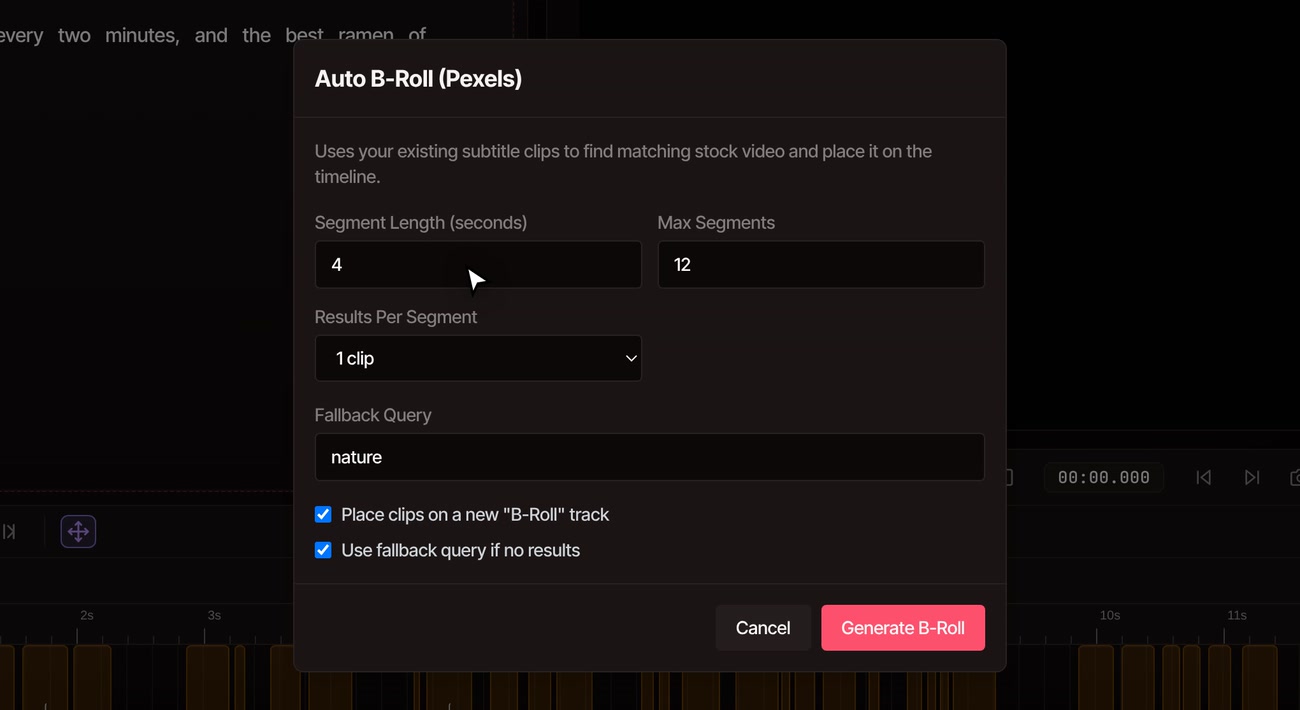
Press Generate B-RollThe status line counts through the search and download. Each clip lands on a new B-Roll track, over the words it was found for.
What it does
Four settings, and a few limits.
-
Footage from Pexels
Every clip comes from Pexels, a free stock library. Its licence allows commercial use with no credit needed. Clips are saved in a Stock Footage folder in your media library.
-
One search per stretch
The words in each stretch of captions are the search, and VidTL takes the first match. It matches on words, not on what the footage looks like, so watch the result once through.
-
Twelve clips to start with
Max Segments is 12, counted from the start of the video. On a longer video, raise it. Segment Length is 4 seconds to start and sets how much speech each clip covers.
-
Up to three clips per moment
Set Results Per Segment to 2 or 3 and each moment gets that many different clips, each on its own B-Roll track. Keep the one you like and delete the rest.
-
When nothing matches
VidTL tries again with just the main words of that stretch. If a stretch has no main words, it searches your Fallback Query instead, which starts as nature. Switch that off and the stretch stays empty.
-
Its own track, and undo
Clips go on a new B-Roll track so your own footage is not touched. A clip that is shorter than its stretch ends early. One undo takes the whole pass back.
Free with a free account
Auto B-Roll and the stock library cost nothing. The captions it reads need a free account, or an SRT file.
Sign up and confirm your email, and captions are written on your own computer at no cost. Pro adds faster captions, and an AI assistant that can lay in B-roll from one request. Every plan exports without a watermark.
See plansQuestions
Questions about auto B-roll.
Is auto B-roll free in VidTL?
Yes. Auto B-Roll itself has no paywall, and the stock footage is free. It needs captions on the timeline, and writing those is free with a free account, or you can drop in an SRT file with no account. Exports have no watermark.
Do I need captions first?
Yes. Auto B-Roll builds its searches from the captions on your timeline. Without them it tells you to generate subtitles first. Auto caption generator covers how.
Where does the footage come from?
Pexels, a free stock library. Its licence lets you use clips in commercial work without giving credit, though it does not let you resell them as they are or present them as endorsing a product.
Can I choose the footage myself?
Yes. Click a clip and delete it, then open the Stock tab, search, and add the clip you want in its place. The clips Auto B-Roll adds are ordinary clips, so you can also trim, move or fade them.
Does my video get uploaded?
No. The words from your captions are sent to VidTL to search the stock library, and the clips are downloaded to your computer. Your own video stays where it is.
Why did some stretches get no footage?
The search found nothing for those words, and the fallback could not help, or the fallback option is off. Try a shorter Segment Length, a different Fallback Query, or add a clip by hand from the Stock tab.
Keep going
- Auto caption generator Write the captions Auto B-Roll reads.
- Edit video by text Cut the narration by deleting words, then add footage.
- AI voice over Make the narration from a script, then cover it.
- AI video editing assistant Ask for B-roll in plain words. Pro.
- Add music to video Put a track under the footage once it is in.
- Online video editor Trim, move and fade the clips it adds.
Every line you say gets a shot.
Free with a free account. It opens in your browser, with nothing to install and no watermark.