Slow motion and fast forward
Change video speed online, for free.
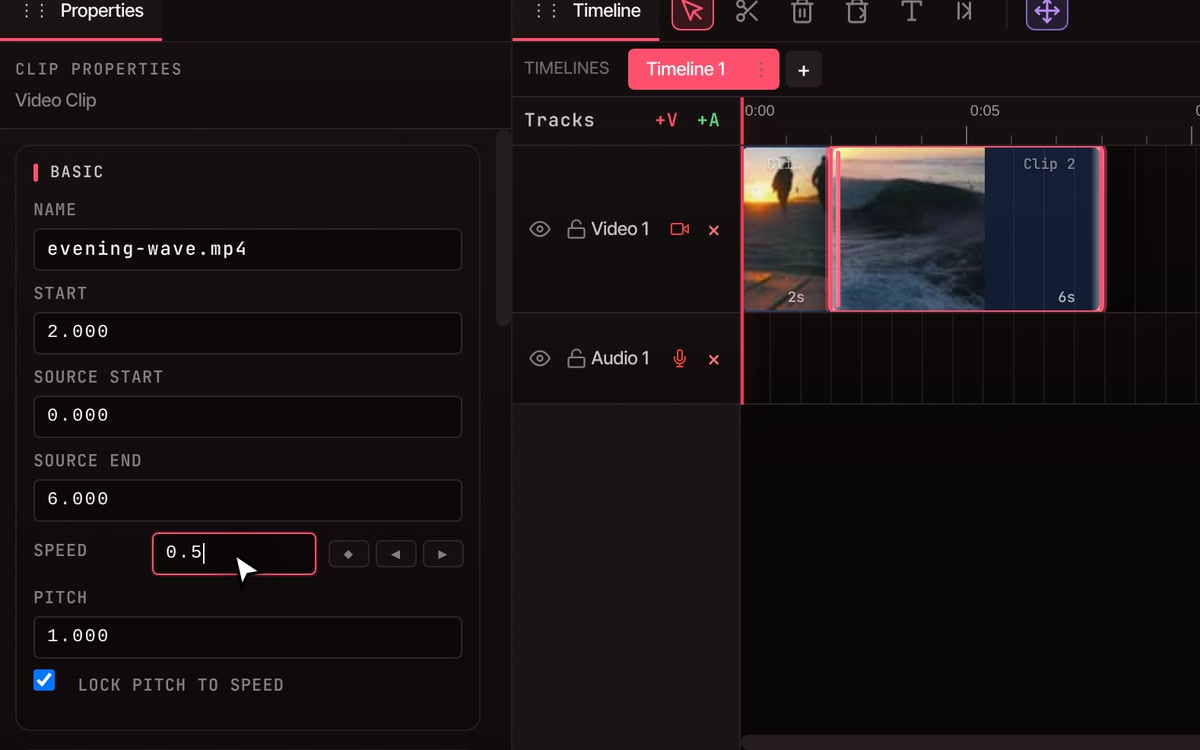
Click a clip, type a number in its Speed box and press Enter. 0.5 plays it at half speed, 2 at double speed. The clip gets longer or shorter on the timeline to match, and its sound goes along.
- No account to start
- No watermark
- Picture and sound change together
How it works
Type a number, the clip resizes.
-
01
Select the clip.Click it on the timeline, then open the Properties tab. The Speed box shows 1.000, which is normal speed.
-
02
Type a speed and press Enter.0.5 is half speed, 2 is double, 4 is four times as fast. The clip stretches or shrinks on the timeline to fit, and its sound changes with it.
-
03
Make room, or close the gap.A slower clip is longer, and the clips after it stay put, so it can end up on top of the next one. Before you slow it, press A, click the clip after it to grab that clip and everything to its right, and drag them along. After speeding a clip up, press Close Gaps to pull the rest back in.
What it does
Slower, faster, and the sound to match.
-
Slow motion
Anything below 1 slows the clip down. 0.5 makes it twice as long and 0.25 four times as long. Use it on the moment you want people to see properly.
-
Fast forward
Anything above 1 speeds the clip up. A 60-second clip at 4 becomes 15 seconds. The Speed box takes numbers from 0.1, ten times slower, up to 100, a hundred times faster.
-
How smooth slow motion looks
VidTL shows each frame for longer instead of making up new ones, so slow motion is smoothest on footage filmed at 60 frames per second or more. Ordinary 30 frames per second footage gets steppy when you slow it a lot.
-
Sound follows the picture
A video’s sound is tied to its picture, so both change together and stay in step. By default the pitch follows the speed too: voices rise when you speed up and drop when you slow down. Sound-only clips have their own Speed box as well.
-
Normal-sounding voices
Untick Lock Pitch to Speed, then set Pitch to 1. The clip keeps its new speed and the voice goes back to its natural pitch. Pitch can be set anywhere from 0.25 to 4.
-
Speed that changes
Click the diamond beside Speed to add a speed point at the playhead, move the playhead and type a different speed to add another. The clip glides from one speed to the next, so you can play at normal speed and drop into slow motion at the best moment.
Questions
Speed questions, answered.
Is changing video speed really free?
Yes. Changing a clip’s speed needs no account, and the finished video has no watermark. Exports go up to 8K at any length.
Does my video get uploaded?
No. You edit and export on your own computer, so the footage stays there. It only leaves if you choose to save to cloud storage or use a tool that runs on VidTL’s servers.
How do I change the speed of just part of a video?
Put the playhead where the part begins and press S, then do the same where it ends. Click the middle piece and change its Speed. Slowing it makes that piece longer, so press A and drag the clips after it to the right first, to make room.
Is the Speed box the same as the playback speed keys?
No. The playback speed keys (Shift with > or <) only change how fast the editor plays while you work. They do not change your video or your export. The Speed box changes the clip itself.
Does changing the speed alter my original file?
No. Speed is a setting on the clip in your project. Your original file is never touched, and you can undo the change or type 1 in the Speed box to put it back. You get a new video when you export.
Can I change video speed on my phone?
Not today. The editor needs a desktop or laptop computer. Chrome, Edge, Brave, Arc and Firefox all run it well, and Safari works for lighter editing.
Works with
- Split video Cut a clip into pieces so one part can run at its own speed.
- Trim video Cut the start and end off a clip before you change its speed.
- Remove silence Cut the dead air out instead of speeding the whole talk up.
- Add music to video Put a track under your slow motion shot.
- Merge videos Join clips at different speeds into one finished video.
- Online video editor Everything else the editor does, from the same timeline.
Slow it down. Speed it up.
Open the editor and type a speed. No account, no watermark, nothing to install.