
DaVinci Resolve alternative
A DaVinci Resolve alternative that runs in a browser.
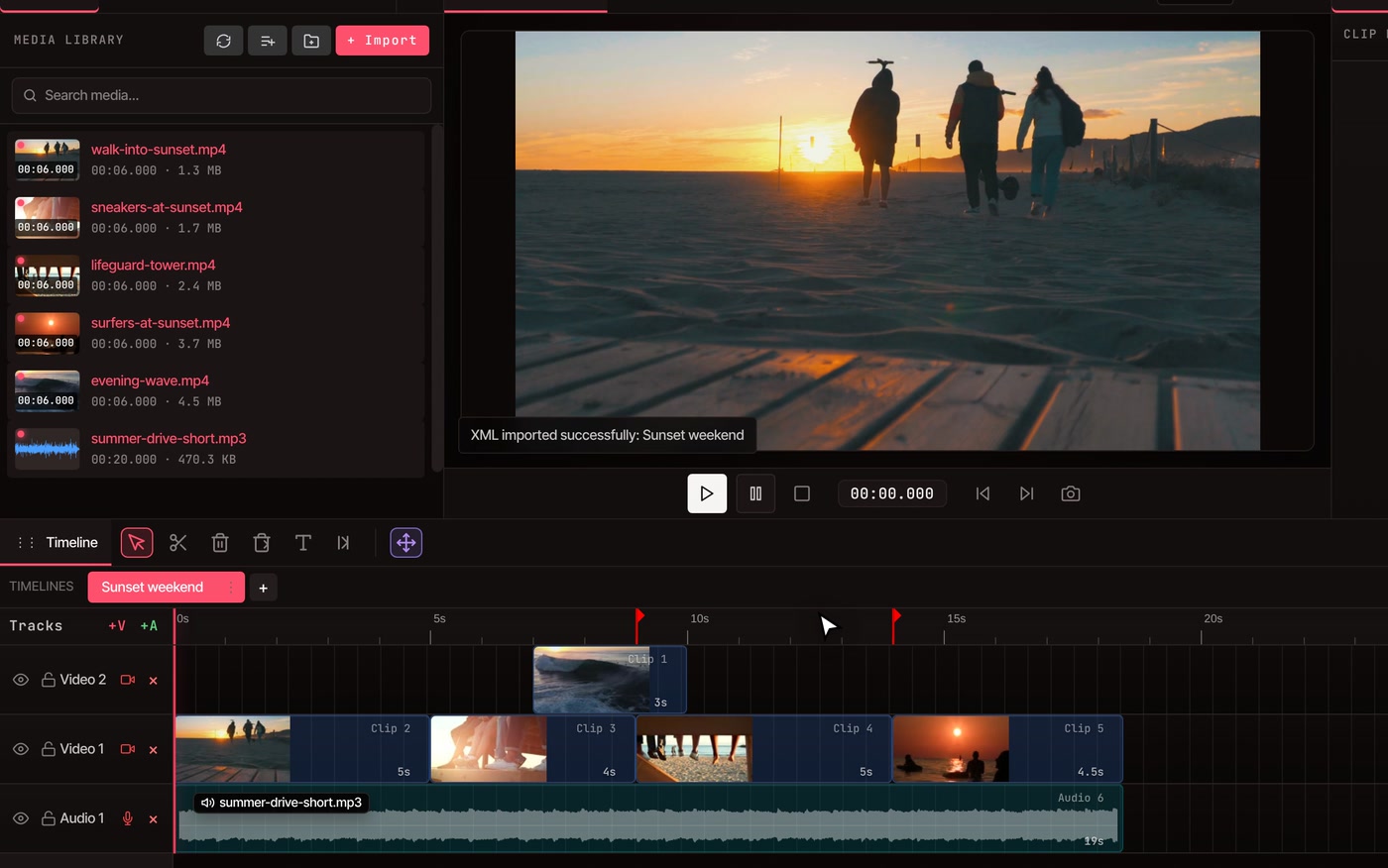
VidTL is a full multi-track video editor that runs in your browser, with nothing to install and no watermark. It opens timelines saved from DaVinci Resolve as FCP 7 XML, and saves your edit back in the same format.
- Nothing to install
- No watermark
- Exports up to 8K
The round trip
Out of Resolve, into the browser, and back.
-
01
Save the timeline from Resolve.Choose File › Export › Timeline and pick the FCP 7 XML format, not FCPXML. The file lists your footage but does not contain it.
-
02
Open it in VidTL.Put the footage in the Media tab, choose File › Import XML/Zip (FCP7), and pick the file. Add to Current uses the footage already in the Media tab. New Project asks you to pick the footage again.
-
03
Keep editing.Trim, split, add titles, keyframes and masks, or clean up the sound. The timeline behaves like any other VidTL timeline.
-
04
Send it back.Choose File › Export for DaVinci Resolve and pick XML with all media files (ZIP). In Resolve, unzip it and use File › Import › Timeline. If Resolve asks where the footage is, point it at the unzipped folder.
What moves between them
The edit crosses over. The colour work stays behind.
-
Into VidTL
Picture and sound tracks, with every clip, cut and start point. Size, position, rotation, opacity and speed on picture clips, and levels on sound clips. Markers, text titles, and the timeline’s size and frame rate.
-
Left behind on the way in
Transitions, keyframes, effects, masks and crop are not read from the file, and neither are colour grades. Rebuild what you need in VidTL, or finish that part in Resolve.
-
Back to Resolve
Cuts, tracks, position, scale, rotation, opacity, speed, volume, markers and plain text titles are written into the file as ordinary timeline data. So are simple keyframes on position, size, opacity, rotation and volume.
-
Drawn into video
Blur, colour correction, masks, green screen and background removal, flipped clips and animated graphics can’t be written into the file. With XML with all media files (ZIP), VidTL renders each one as a video clip, keeps any see-through parts, and puts it back in place. With XML only, it warns you which clips are affected. Reverb, EQ and compressor effects on sound are left out.
The comparison
VidTL and DaVinci Resolve, side by side.
Resolve has a free version too, so price is not the difference. The differences are what you install, what each one is built for, and where the AI sits.
Swipe the table sideways to see both columns.
| Compared on | VidTL | DaVinci Resolve |
|---|---|---|
| Price | Free to start, with no account and no watermark. | A free version. The Studio version is $295. |
| Install | Nothing. It runs in the browser on a desktop or laptop. | A download and install, for Windows, Mac or Linux. |
| Biggest export | 8K, on every plan. | The free version works up to Ultra HD (3840 x 2160) at up to 60 frames a second. Studio goes beyond 4K and up to 120. |
| Colour | Sliders for exposure, contrast, highlights, shadows, whites, blacks, temperature, tint, saturation and hue, plus automatic correction. No scopes, curves or LUTs. | A dedicated Color page, with HDR grading in the free version. |
| Effects | Blur, green screen removal, masks, keyframes, and ready-made titles and graphics. | A Fusion page for visual effects and motion graphics. |
| Sound | Noise suppression, voice isolation, loudness matching, and reverb, EQ and compressor effects on a clip. | A Fairlight page for mixing sound. |
| Edit by text | Delete words from the transcript to cut the video. Free with a free account. | Text-based editing is part of Studio. |
| AI | An assistant that makes edits from a typed request. Part of Pro. | The DaVinci AI Neural Engine, part of Studio. |
| Your computer | Chrome, Edge, Brave, Arc or Firefox, and Safari for lighter editing. Not for phones. | Blackmagic lists graphics card and memory requirements. Check them before you install. |
Choosing
Resolve is better at some jobs. VidTL is quicker at others.
-
Stay in Resolve for
Careful colour grading, visual effects in Fusion, mixing sound, and projects shared between several editors. If your work lives on those pages, Resolve is the better tool and VidTL does not try to replace it.
-
Use VidTL for
A quick cut on a computer with nothing installed, titles, captions with a free account, cleaning up sound, and AI edits from a typed request. It opens in a browser tab, and your footage stays on your computer.
-
Use both
Cut in VidTL, then send the timeline to Resolve for the grade and the mix. Or cut in Resolve, open the timeline in VidTL for titles and captions (captions need a free account), and send it back.
Questions
Switching from Resolve.
Can VidTL open a DaVinci Resolve project?
It opens timelines, not whole projects. In Resolve, export the timeline as an FCP 7 XML file, then choose File › Import XML/Zip (FCP7) in VidTL. VidTL does not read Resolve’s own project files, and it does not read the newer FCPXML format.
Is VidTL free like Resolve’s free version?
Both have a free version. VidTL needs no account to start, puts no watermark on exports and exports up to 8K on every plan. Blackmagic lists Ultra HD as the top size for Resolve’s free version. VidTL’s AI features are part of Pro, and editing by text needs a free account. See the plans.
Will it run on my computer?
VidTL runs in Chrome, Edge, Brave, Arc or Firefox on a desktop or laptop, and in Safari for lighter editing. There is nothing to download, and it does not run on phones. Long 4K timelines with many layers are heavy in any editor, so expect them to feel slower on an older computer.
What does Add to Current do?
It keeps what is in your Media tab and fills the open timeline from the file, replacing what was on it. The project takes the file’s size and frame rate. New Project does the same but empties the Media tab first, then asks you to pick the footage again.
Why is there a script in the ZIP?
The free version of Resolve on Linux can’t open H.264 or H.265 video, which is what most MP4 files use. The script converts your footage to formats it can read, and it needs FFmpeg installed on that computer. It is in every ZIP. Ignore it if your footage already opens in Resolve.
Can I grade colour in VidTL?
You can correct it: ten sliders and an automatic setting, as in color correct video. There are no scopes, curves or LUTs, and nothing like Resolve’s Color page. For a careful grade, do it in Resolve.
Can the AI assistant edit a timeline from Resolve?
Once the timeline is open, the AI assistant works on it like on any other. Everything it does lands on the timeline as ordinary edits you can undo. The assistant is part of Pro.
Also in the editor
- Online video editor Everything else the editor does, with no watermark.
- Premiere Pro alternative The same timeline file route, for Premiere Pro projects.
- Film editor Tracks, keyframes and masks for short films and documentaries.
- Color correct video The colour sliders and automatic correction, before and after.
- Edit video by text Cut a video by deleting words from its transcript.
- AI video editing assistant Type what to change and it makes the edit. Part of Pro.
Bring your timeline, keep editing.
Open the editor and start. No download, no account to start, no watermark.