
Video ad maker
Make the ad once, run it in every size.
Cut your footage, add a headline and a call to action from the Graphics gallery, then export widescreen, vertical and square versions in one go. It runs in your browser, with no watermark, and your footage stays on your computer.
- No account to start
- No watermark
- Nothing to install
How it works
From clips to a finished ad.
-
01
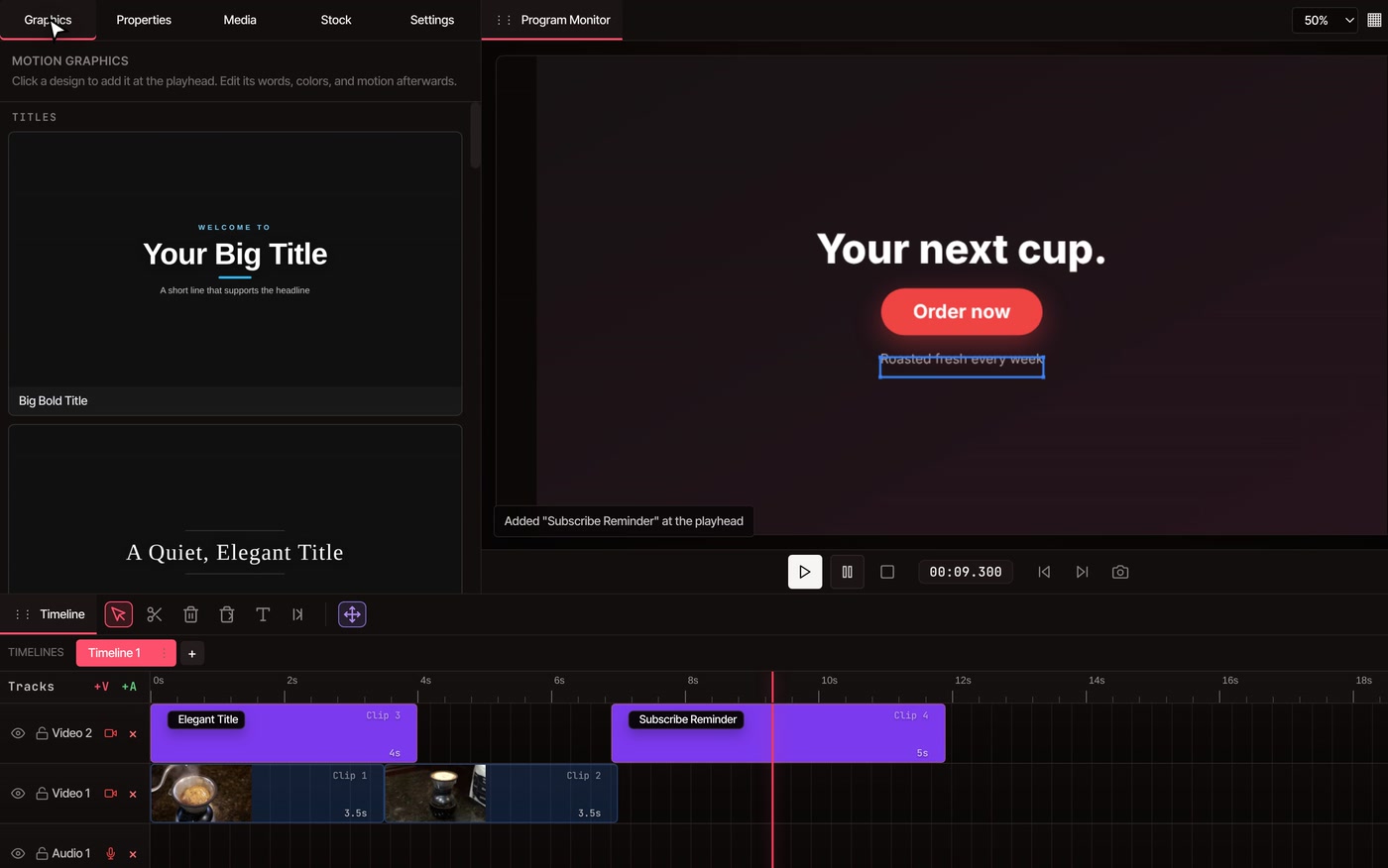
Put your shots on the timelineImport your footage, logo and photos in the Media tab, or search free stock clips in the Stock tab. Trim each shot to the length the ad needs.
-
02
Add a title and an end screenOpen the Graphics tab and click a design to add it at the playhead. Then double-click its words on the picture and type your own.
-
03
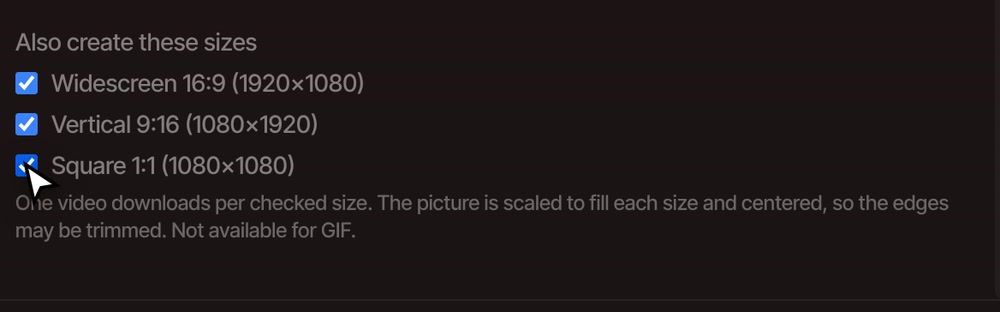
Export every size you needOpen File, then Export Video, and tick the sizes under Also create these sizes. One video downloads for each.
Sizes
One edit, three shapes.
Widescreen 16:9 (1920×1080) suits YouTube and your own site. Vertical 9:16 (1080×1920) suits Stories, Reels, Shorts and TikTok. Square 1:1 (1080×1080) suits feed posts.
Each size is scaled to fill the frame and centered, so the edges that do not fit are trimmed. Vertical keeps about a third of a widescreen picture's width and square keeps a little over half, so put the product and the headline in the middle and keep the words short. Want to place it yourself? Resize video shows how.
What goes in an ad
Everything an ad needs, in one timeline.
-
Titles and end screens
The Graphics gallery has ready-made titles, name tags, callouts, cards and end screens. Add one, then change its words, colors and motion. It is free.
-
Your own footage and logo
Import clips and pictures from your computer, or search the Stock tab for free clips and photos. You can filter stock by landscape, portrait or square.
-
Captions for sound-off
Add captions for people who watch without sound. They are free with a free account. Auto caption generator covers how.
-
A voiceover
Type your script into the Text to Speech tool and add the result to the timeline. It is part of Pro. You can also record your own voice or import a recording for free.
-
Music
Import a track you have the rights to, or generate one with Generate Music (Pro). See add music to video.
-
A film of your website
Give the AI assistant your address and it builds a promo film from your real page. It is part of Pro. Website promo video shows one being made.
Free and Pro
Pro adds the voice, the music and the AI assistant.
The ad itself is free to make: the timeline, titles and end screens from the gallery, stock clips, your own footage and exports in all three sizes, with no watermark and up to 8K. Text to Speech, Generate Music and website promo films need a Pro plan.
See plansQuestions
Questions about video ads.
Is it free to make a video ad?
Yes. The editor needs no account to start and puts no watermark on any plan. Pro is only for the voiceover, generated music, the AI assistant and website promo films.
Can I make vertical and square versions of the same ad?
Yes. In the export window, tick Widescreen 16:9, Vertical 9:16 and Square 1:1 under Also create these sizes, and you get one video for each. The picture is trimmed to fit, so keep the headline and product near the middle.
Can I use my own logo and product shots?
Yes. Import them from your computer in the Media tab and place them on the timeline like any clip. Pictures and video both work.
Can I use the stock footage in an ad?
The Stock tab searches Pexels. Check the Pexels licence for your kind of ad. That licence belongs to Pexels, not to VidTL.
Does my footage get uploaded?
No. Editing and exporting happen on your own computer. Footage leaves it only if you save to cloud storage or use a tool that runs on our servers, such as Text to Speech or Generate Music.
Can I make an ad on my phone?
Not yet. The editor needs a desktop or laptop computer. You can still post the finished vertical version from your phone.
Also for ads
- Resize video Export one edit as widescreen, vertical and square.
- Motion graphics templates Titles, name tags and end screens you can retype.
- Add music to video Put a track under the ad and set its level.
- AI voice over Turn your script into a spoken voiceover.
- Website promo video Let the AI assistant build a film from your site.
- Auto caption generator Captions so the ad works with the sound off.
Your next ad, in every size.
Free to start, no watermark, and your footage stays on your computer.