Skip to content

Kapwing alternative

A Kapwing alternative with no watermark.

VidTL is a video editor that runs in your browser, with a full multi-track timeline. Exports have no watermark on any plan, no length limit, and go up to 8K. Kapwing's free plan adds a watermark, stops at 720p and caps each export at 4 minutes.

  • No watermark
  • Any video length
  • No account to start
One typed request trims twelve clips, adds music and a title, then the video exports on this computer. The assistant is part of Pro. Exporting is free.

Compared

VidTL and Kapwing, side by side.

VidTL's free plan next to Kapwing's Free and Pro plans. Where Kapwing is ahead, the table says so.

Swipe the table sideways to see Kapwing's columns.

Checked in October 2026 on kapwing.com/pricing and kapwing.com/video-editor. Prices in US dollars. Plans change, so check Kapwing's site before you decide.
What you get VidTL free plan Kapwing Free Kapwing Pro
Watermark on exports None, on every plan Yes None
Highest export quality Up to 8K 720p 4K
Longest export No limit 4 minutes 2 hours
Video exported per month No limit 30 minutes No limit
Where your files are On your computer, unless you save them online or use a tool that runs on VidTL's servers Uploaded to your Kapwing workspace, up to 2 GB a file Uploaded, up to 6 GB a file
How long projects are kept Saved to a folder you pick. A free account with a confirmed email also saves online 3 days As long as you subscribe
Automatic captions Free with a free account, with no minute limit Up to 10 minutes Up to 1,000 minutes a month
Remove silences automatically Free, no account Not included Yes
Steady shaky footage Free, no account Not included Yes
Remove a video's background Free, on your computer Not included Yes
Save captions as SRT or VTT Not yet. VidTL can read an SRT file in, but not write one Not included Yes
Edit with other people Share a link and they open their own copy. You can't edit the same project together Yes, with real-time editing and comments Yes, plus Brand Kit and custom fonts
Phones and tablets No. Needs a desktop or laptop Yes Yes
The paid plan Pro adds the AI assistant, voiceovers from text, AI music and video, and cloud exports. Prices are in the plans below $0 $16 a month billed yearly, or $24 billed monthly, per member

Why people switch

Where VidTL is the better fit.

  • Clean exports, free

    The free plan exports with no watermark, at any length, up to 8K. On Kapwing's free plan every export carries its watermark, stops at 720p and 4 minutes, and you get 30 minutes of exported video a month.

  • Your footage stays with you

    VidTL edits and exports on your own computer, so there is no upload to wait for. Files leave it only if you save them online or use a tool that runs on VidTL's servers. Kapwing is cloud based: your projects live in its workspace.

  • Tools Kapwing keeps for Pro

    Removing silences, steadying shaky footage and removing a video's background all run free on your computer here, with no account. The faster, server-run background removal is part of Pro.

  • An assistant that edits for you

    On Pro, the AI assistant takes a typed request, like cut the pauses or add captions, and makes the edit. Every change is an ordinary clip on your timeline that you can adjust or undo.

Fair is fair

Where Kapwing is the better fit.

VidTL isn't the right pick for every job. If one of these is the reason you use Kapwing, stay with it.

  • Editing with other people

    Kapwing has real-time editing, comments and shared workspaces on every plan. VidTL can share a project by link, but each person opens their own copy.

  • Phones and tablets

    Kapwing also works on iOS and Android. VidTL needs a desktop or laptop computer and shows "Desktop computer required" on a phone.

  • Translating into other languages

    Kapwing translates subtitles into more than 60 languages and dubs speech into more than 40. VidTL writes captions in the language spoken, in 18 languages, and doesn't translate them.

  • Starting from a template

    Kapwing lists thousands of templates. VidTL's graphics gallery has 12 animated titles, lower thirds, callouts and cards.

  • Pasting in a web link

    Kapwing can pull a video in from a pasted link. VidTL opens files from your computer and searches free stock footage, but it doesn't download from links.

  • Saving captions as a file

    Kapwing Pro can save subtitles as an SRT or VTT file. VidTL can't yet: its captions go into the exported video.

Switching

Moving a project over takes four steps.

  1. 01

    Get your clips out of KapwingDownload your original clips. Kapwing exports videos, pictures, audio and GIFs, so there is no project file to bring across. A Free-plan export carries Kapwing's watermark, so use originals where you have them. Kapwing's pricing page lists 3 days of project storage on Free, so do this first.

  2. 02

    Open VidTL and bring them inThe editor opens in your browser with no account. Choose File › Import Media and pick your files.

  3. 03

    Rebuild the editTrim, layer and add titles on the timeline. For captions, choose Tools › Generate › Generate Subtitles, free with a free account. If you saved an SRT file from Kapwing Pro, Import Media reads that too.

  4. 04

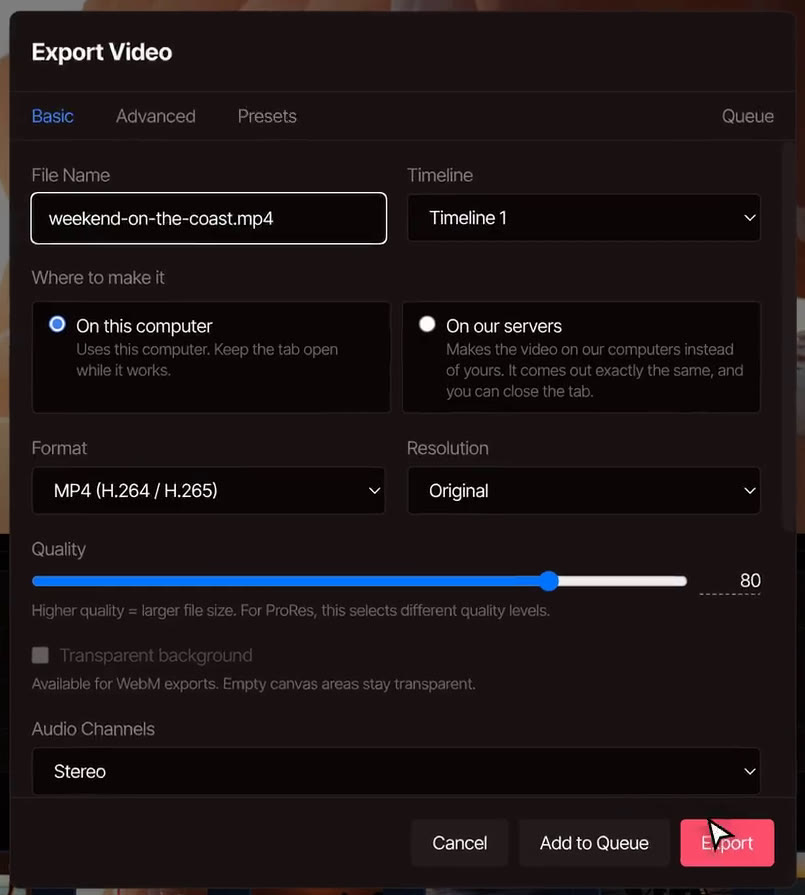
    Export itChoose File › Export Video. Under Where to make it, pick On this computer. The file has no watermark.

The Export Video window in VidTL. The file name is weekend-on-the-coast.mp4, Where to make it is set to On this computer, the format is MP4, the resolution is Original, and the Export button is ready.

Pricing

Start free. Upgrade for the AI.

Every plan edits videos of any length and exports without a watermark. Pro adds the AI assistant that does the editing for you. Cancel anytime.

Hobby

For first videos and weekend projects.

$0forever

No card needed

Start free

AI credits each weekNone

  • Unlimited video length
  • No watermark, exports up to 8K
  • Edit video by editing text
  • Automatic captions
  • Background removal
  • 5 GB of cloud storage
  • Not included: AI assistant
  • Not included: Voiceovers from text
  • Not included: AI music and video
  • Not included: Cloud exports
Most popular

Pro

For creators who publish every week.

$29$23/ month

billed yearly, $276 a year

Go Pro

AI credits each week1×

Everything in Hobby, plus:

  • AI assistant that edits for you
  • Automatic rough cuts
  • Voiceovers from text, even in your own voice
  • AI music and video
  • Faster captions and background removal
  • Cloud exports, so you can close the tab
  • 100 GB of cloud storage

Studio

Best value

For studios and anyone publishing every day.

$99$79/ month

billed yearly, $948 a year

Get Studio

AI credits each week5×

Everything in Pro, plus:

  • 5×AI credits, refilled every week
  • 5×AI edits and rough cuts
  • 5×Voiceovers, in any voice
  • 5×AI music and video clips
  • 5×Fast captions and background removal
  • 1 TB of cloud storage

Prices in US dollars. Yearly plans are billed once a year.

Questions

Before you make the switch.

Is VidTL really free, with no watermark?

Yes. Every plan, the free one included, exports with no watermark and any video length, up to 8K, and you can start editing without an account. Pro adds the AI assistant, voiceovers from text, AI music and video, and cloud exports. On Kapwing's free plan, exports carry its watermark and stop at 720p and 4 minutes.

Can I open my Kapwing project in VidTL?

Not as a project. Kapwing exports finished videos, pictures, audio and GIFs, so there is no project file to carry across. Download your original clips, and an SRT file if you are on Kapwing Pro, then rebuild the edit in VidTL. Do it soon if you are on Kapwing's free plan, which keeps projects for 3 days.

Can I edit by text, like in Kapwing?

Yes. VidTL writes out every word, and when you delete words from the transcript the picture and sound are cut with them. Red marks show each cut before it happens. Writing the transcript is free with a free account. Edit video by text shows how.

Can my team edit together?

Not at the same time. Choose File › Share Project and VidTL makes a link, which needs an account. Whoever opens it gets their own copy, and the original stays with you. If your team needs to edit one project live and leave comments on it, Kapwing is the better fit.

Does VidTL work on a phone or tablet?

No. It needs a desktop or laptop computer. On one, there is nothing to install: Chrome, Edge, Brave, Arc and Firefox all run it well, and Safari works for lighter editing.

Does my footage get uploaded?

Only when you choose. Editing and exporting happen on your own computer. Files leave it if you save them to online storage or use a tool that runs on VidTL's servers, like priority background removal.

Your next export has no watermark.

Open the editor in your browser, bring your clips in and export free. Nothing to install, and no account needed to start.