
Switching from Final Cut Pro
A Final Cut Pro option that runs on Windows.
Final Cut Pro doesn’t run on Windows. Apple makes it for Mac and iPad only. VidTL is a multi-track video editor that opens in Chrome, Edge, Brave or Firefox on a Windows PC, with nothing to install. It can’t open a current Final Cut Pro project, so see what carries over before you move.
- Works on Windows
- Nothing to install
- No watermark
Moving over
Your footage comes across. A current Final Cut project doesn’t.
-
Finished videos and clips
MP4 and MOV files open, whether you exported them from Final Cut Pro or filmed them. Press Import in the Media tab, or drag them in. They stay on your computer.
-
ProRes files, with a catch
ProRes opens, but VidTL first makes a smaller copy that plays smoothly while you edit, and your export is made from that copy. It comes out lower in quality than the ProRes you started with, so keep the originals for any final master.
-
Timelines saved as FCP 7 XML
File › Import XML/Zip (FCP7) opens a timeline saved in the older Final Cut Pro 7 format, which Premiere Pro and DaVinci Resolve can also save. Tracks, clips, cut points, markers, position, size, rotation, opacity, speed and volume come across. Transitions and effects don’t.
-
Current Final Cut Pro projects
Final Cut Pro 10 and later keeps projects in its own libraries and hands them to other apps as FCPXML, which VidTL can’t read. On the Mac, export the finished video or the original clips, bring them here and rebuild the cuts.
How editing feels
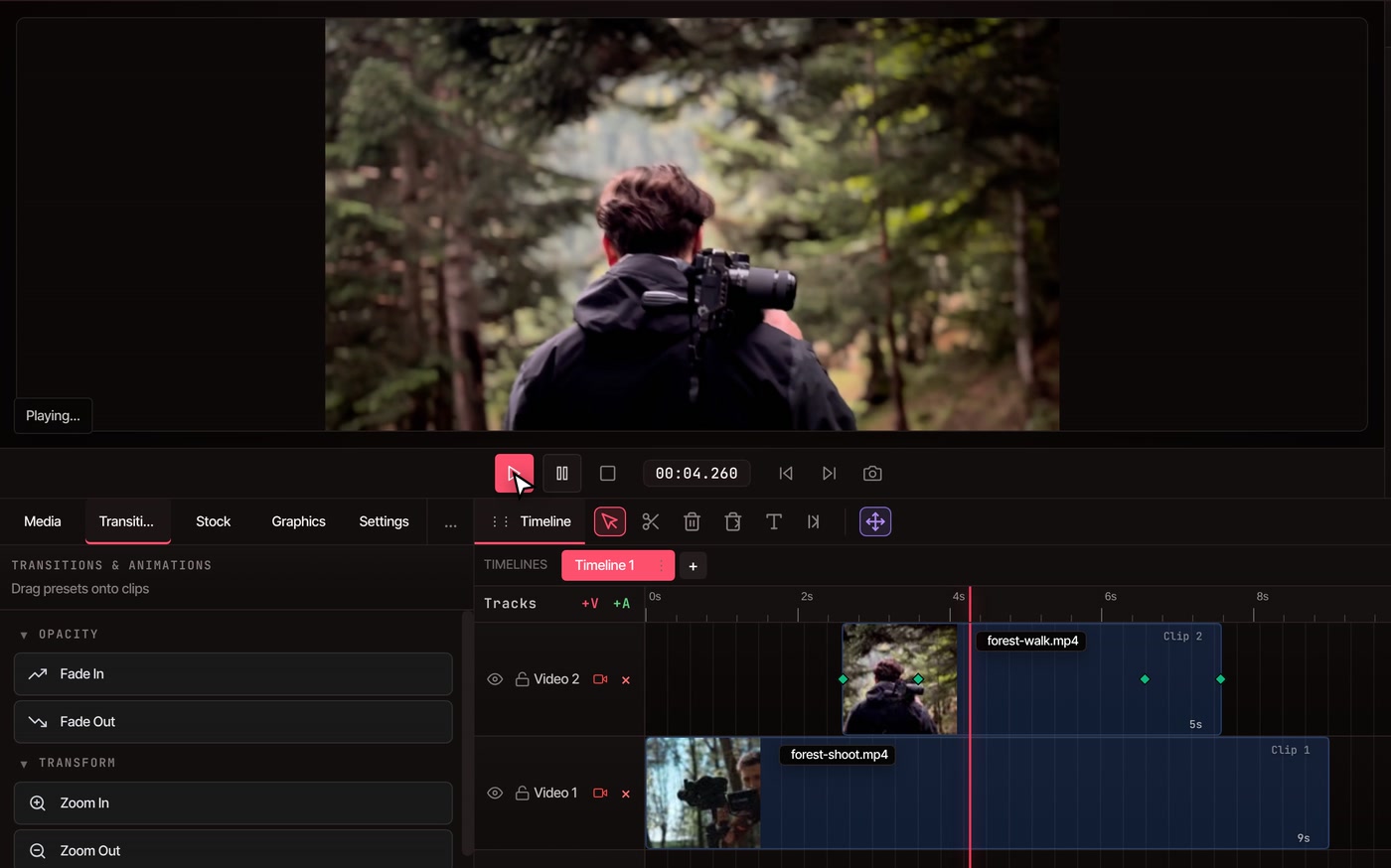
Stack clips on tracks. Cut away to b-roll.
-
01
Bring your clips in.Press Import in the Media tab, or drag files in. Put the main shot on Video 1.
-
02
Drag a clip onto the track above.Video 2 sits over Video 1, so the new clip covers the main shot where it lands. Clips stay where you put them, because the timeline isn’t magnetic. +V adds another picture track.
-
03
Drop Fade In and Fade Out on its ends.Open the Transitions tab and drag a preset onto the clip. Cross Dissolve, zooms and slides are in the same list.
-
04
Play it back, then export.File › Export Video saves an MP4, MOV, WebM or GIF. The file is made on your computer.
Compared
Final Cut Pro and VidTL, side by side.
Both have automatic captions, background removal, object tracking, voice isolation and beat detection, so the table sticks to what differs. If you own a Mac and need HDR, ProRes RAW or Apple’s companion apps, Final Cut Pro is the stronger tool.
Swipe the table sideways to see Final Cut Pro’s column.
| What you get | VidTL | Final Cut Pro |
|---|---|---|
| Where it runs | In a browser on a desktop or laptop computer, Windows included. Nothing to install | Mac and iPad. There is no Windows version |
| Price | Free to start with no account, and no watermark on any plan. The AI tools are part of Pro (see plans) | $299.99 once, for Mac. Or $12.99 a month in Apple Creator Studio, free for the first 30 days |
| What it needs | A current browser. Chrome, Edge, Brave and Firefox all run it well | macOS 15.6 or later and 8 GB of memory (16 GB recommended). Some features need a Mac with Apple silicon |
| Timeline | Tracks you stack and trim, with Cut, Ripple Delete and Close Gaps tools. Not magnetic | Magnetic Timeline, which keeps clips in sync as you move and trim them |
| Moving projects | Opens and saves FCP 7 XML. Doesn’t read FCPXML | Exchanges libraries, events and projects as FCPXML |
| HDR and ProRes RAW | Not supported. VidTL edits standard-range video | HDR video, and ProRes RAW shot with Final Cut Camera |
| Graphics and encoding | Title and graphics templates are built in | Motion for graphics and Compressor for encoding come with Apple Creator Studio |
| Export | MP4 (H.264 or H.265), MOV (H.264, H.265 or ProRes), WebM and GIF, up to 8K | H.264 and HEVC, with more formats through Compressor |
Questions
Before you switch.
Is there a Final Cut Pro for Windows?
No. Apple sells Final Cut Pro for Mac and iPad only. VidTL is a separate editor that runs in your browser on Windows, with a multi-track timeline, keyframes, masks, effects and export up to 8K.
Can I open my Final Cut Pro project in VidTL?
Not a current one. Final Cut Pro 10 and later hands projects to other apps as FCPXML, and VidTL only reads the older FCP 7 XML. Export the finished video or the original clips from Final Cut Pro, bring them in and rebuild the cuts. Timelines saved from Premiere Pro or DaVinci Resolve as FCP 7 XML do open: see how that works for Premiere Pro.
Is VidTL really free?
You can edit and export with no account, and nothing you export carries a watermark, on any plan. Automatic captions need a free account. The AI tools are part of Pro. The pricing page has the details.
Will it run on my Windows PC?
If it has a current Chrome, Edge, Brave or Firefox, yes, and there is nothing to install. It needs a desktop or laptop screen, not a phone. Long 4K timelines ask a lot of any computer, so a recent PC with plenty of memory helps.
What about DaVinci Resolve?
DaVinci Resolve has a free version for Windows, Mac and Linux. It is the stronger tool for colour grading, and you install it. VidTL opens in a browser tab and has AI editing on Pro. See how they compare.
Keep reading
- Video editor for Windows What runs on a Windows PC, and in which browser.
- Premiere Pro alternative Open a Premiere Pro timeline in the browser.
- DaVinci Resolve alternative Resolve is free too. Where each one fits.
- Online video editor The whole editor: tracks, keyframes, masks and export.
- Video transitions Fades, dissolves, zooms and slides, from the Transitions tab.
- Multicam video editor Line up angles by sound and cut to whoever is talking.
Start cutting on Windows. Nothing to install.
Open the editor in a browser tab. No account to start, and no watermark on any plan.