
Premiere Pro alternative
A free alternative to Premiere Pro.
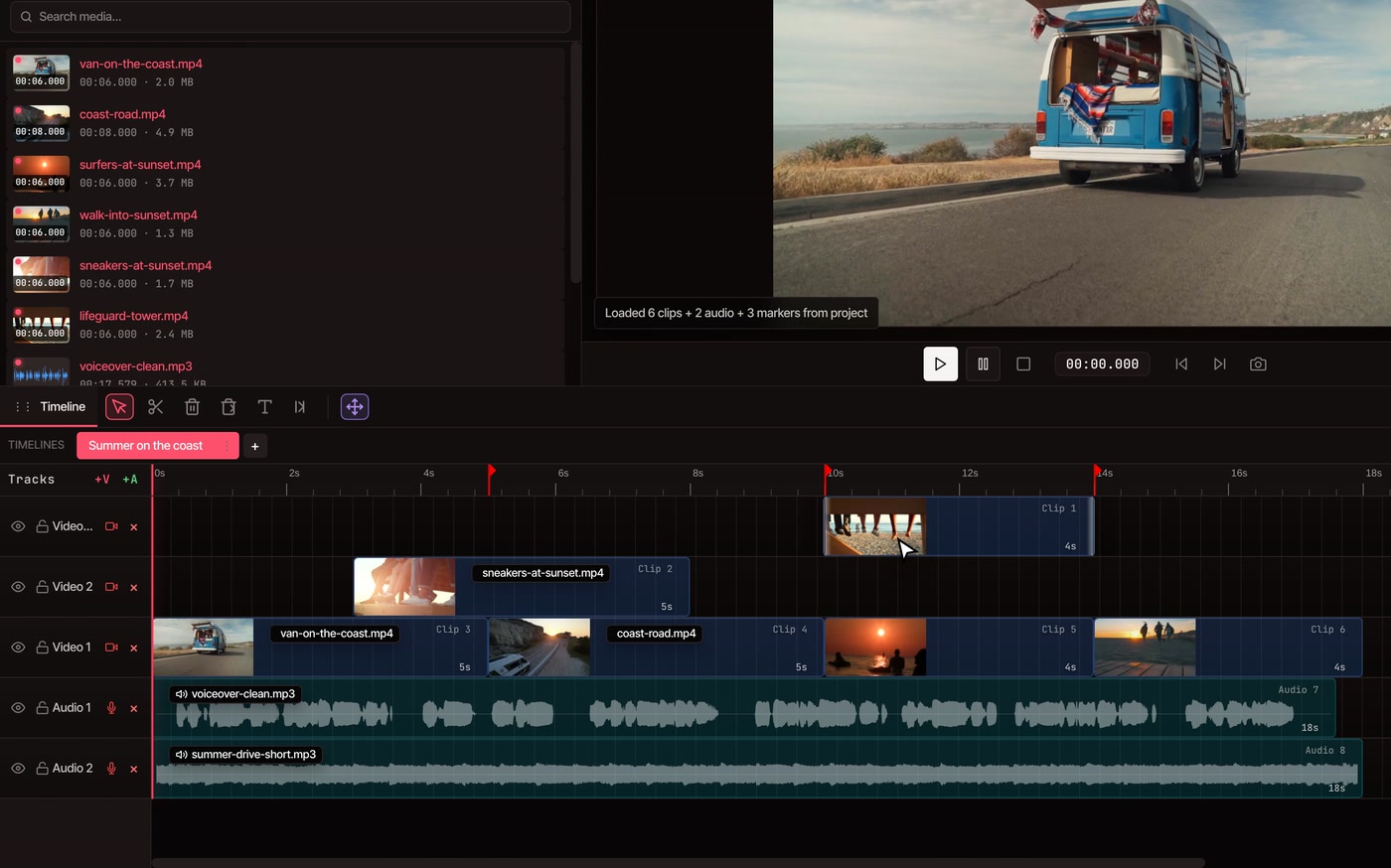
VidTL edits video in your browser, with nothing to install and no watermark. Save your Premiere Pro sequence as Final Cut Pro XML and open it here: your tracks, clips and markers come with it. Transitions and effects don’t, and this page says which is which.
- Free, no watermark
- Nothing to install
- Send edits back to Premiere
Move a project over
Open a Premiere Pro sequence in VidTL.
-
01
Save the sequence as XML in Premiere ProChoose File › Export › Final Cut Pro XML. Leave your footage where it is. The file only points to it.
-
02
Open the XML in VidTLChoose File › Import XML/Zip (FCP7), pick the file, and answer New Project.
-
03
Point VidTL at your footageThe editor lists the files the sequence uses. Choose Import Now and select them. They are matched by file name, and every clip lands where it was.
Prefer one step? Put the XML and your footage in a single zip and import that. A Premiere Pro project file (.prproj) can’t be opened, only the XML saved from it.
What moves across
What comes across and what doesn’t.
The XML file carries the cut: what is where, for how long, and how it is placed. It doesn’t carry most of the look. Expect to rebuild transitions, effects and animation.
Comes across
- Picture and sound tracks, with every clip in place and trimmed as it was
- Each clip’s position, size, rotation and opacity
- Speed changes, including reverse
- Sound levels and muted clips
- Hidden and locked tracks
- Sequence markers, with their names and notes
- The sequence’s frame size and frame rate, which become the project’s
Rebuild in VidTL
- Transitions. The Transitions panel has fades, zooms, slides and a cross dissolve
- Effects and colour grades. Colour correction and blur are in the Effects panel
- Animation. A clip keeps one position and size until you add keyframes
- Sound effects and animated volume
- Titles and graphics, which aren’t reliably carried over. Use VidTL’s text clips and motion graphic templates
- Nested sequences. Replace them with their clips before you export, or they arrive as stray clips on extra tracks
- Extra sequences. If the file holds several, only the first opens
Going back
Send your edit back to Premiere Pro.
-
One menu item
Choose File › Export for Premiere Pro. The tracks, clips, position, size, opacity, speed, text and markers are written as the same kind of XML file, ready for File › Import in Premiere Pro.
-
Effects can be rendered
VidTL can’t write blur, colour correction, masks, animated graphics or a green screen key into the XML. Choose the zip option and VidTL renders those clips as video and puts them where the originals were. With XML only, you’re told which clips lose their effects.
-
Footage goes along
The zip also holds your footage next to the XML. If Premiere Pro asks where the footage is, point it at that folder.
The comparison
VidTL and Premiere Pro, side by side.
Both cut on tracks and export finished video. They differ in what they cost, where they run and what else comes with them.
| Feature | VidTL | Premiere Pro |
|---|---|---|
| Cost | Editing and exports up to 8K are free, with no watermark. Pro adds the AI tools. | $22.99 a month on an annual plan, billed monthly. |
| To start | Open the editor. No account needed. | A 7-day free trial, then a subscription. |
| Install | Nothing. It opens in your browser. | A desktop app you download and install. |
| Computers | A desktop or laptop with Chrome, Edge, Brave, Arc or Firefox. Safari for lighter editing. | Windows and macOS. |
| Phones | Not supported. The editor needs a desktop or laptop. | A separate free Premiere app for iPhone. |
| Moving projects | Opens Final Cut Pro XML. Exports it for Premiere Pro, DaVinci Resolve and Final Cut Pro. | Exports and imports Final Cut Pro XML. |
| Editing by text | Yes, free with a free account. | Yes. Adobe lists text-based editing. |
| AI help | Part of Pro: an assistant that makes edits from a typed request. | Adobe lists Media Intelligence, Object Mask, Generative Extend and Enhance Speech. |
Where Premiere Pro is still stronger.
If your work leans on these, keep Premiere Pro for that part and move the rest. The XML goes both ways.
-
Colour gradingPremiere has a full colour grading system. VidTL has a Color Correction effect for exposure, contrast, highlights, shadows, whites, blacks, temperature, tint, saturation and hue. That fixes a shot. It isn’t a grade.
-
Adobe’s other appsPremiere is part of Creative Cloud, alongside After Effects and Photoshop. VidTL has its own motion graphic templates, but it doesn’t hand work back and forth with After Effects.
-
Very heavy projectsHours of 4K or 8K footage, many layers and nested sequences suit a desktop app that uses your whole computer. VidTL runs in a browser tab, so how it copes depends on your computer and your browser.
-
Plug-insPremiere runs third-party effect plug-ins. VidTL doesn’t.
Questions
Questions about switching.
Can VidTL open a Premiere Pro project file?
Not the .prproj file itself, only XML saved from it. In Premiere Pro, choose File › Export › Final Cut Pro XML. In VidTL, choose File › Import XML/Zip (FCP7) and pick that file.
Is it really free?
Yes. Opening and sending back timelines, editing and exporting up to 8K are free on every plan, with no watermark and no account needed to start. Pro adds the AI tools, such as the assistant that edits from a typed request. See the plans.
Is my footage uploaded?
No. Importing, editing and exporting all happen on your computer. Footage leaves it only if you save to cloud storage or use a tool that runs on VidTL’s servers, like the AI assistant.
What happens to my transitions and effects?
They don’t come across. The clips arrive cut and placed, with no transition between them and no effect on them. Add transitions again from the Transitions panel, and animate with keyframes on position, size, opacity, rotation and volume.
Will my big project run well?
It depends on your computer and your footage. Exports can be up to 8K and any length, but playback while you edit is only as smooth as your machine allows. Open the sequence you care about before you commit: opening it is free and doesn’t touch the original.
Does VidTL have an AI assistant like Premiere's?
Yes, with Pro. Type or say what you want, like cut the pauses and add captions, and it edits the footage on your timeline in the browser. Adobe's AI Assistant in Premiere is in beta in the desktop app. VidTL vs Adobe Firefly compares Adobe's new AI tools with VidTL's.
Keep going
- Online video editor Tracks, trimming, text and export, free and with no watermark.
- Video transitions Put back the fades, slides and cross dissolves that didn’t come across.
- Keyframe animation Animate position, size and opacity again.
- DaVinci Resolve alternative Coming from Resolve instead? The same File menu opens its timelines.
- Final Cut Pro for Windows Moving from Final Cut Pro? See what opens and what doesn’t.
- AI assistant Say what to change and it makes the edit. Pro.
Bring your timeline. Skip the install.
Free, in your browser, with no watermark. Open an XML from Premiere Pro and see what comes across.