
YouTube video editor
Edit your YouTube video in the browser, free.
Cut the rambling by deleting words from the transcript, add captions, b-roll and music, name your chapters, save a frame for the thumbnail, then export with the YouTube 1080p or 4K preset. Nothing to install and no watermark.
- No watermark
- Nothing to install
- Videos of any length
The workflow
From raw footage to the upload.
-
01
Cut the ramblingSelect your clip and choose Tools › Generate › Generate Subtitles. Drag across a false start or click an Um in the Subtitles panel, then delete it. Picture, sound and captions close up together.
-
02
Add b-roll and musicSearch free stock footage and photos in the Stock panel, or let Tools › Generate › Auto B-Roll lay clips over what you say. Import your own music and put it on its own track.
-
03
Name your chaptersMove the playhead to where a part starts, open the Markers panel, click Add Marker and type a name. The panel lists every chapter with its time.
-
04
Save a thumbnail framePark the playhead on the best moment and click the camera button under the preview. The frame lands in your Media library; right-click it and choose Download.
-
05
Export for YouTubeOpen File › Export Video, go to the Presets tab and pick YouTube 1080p or YouTube 4K, then Export.
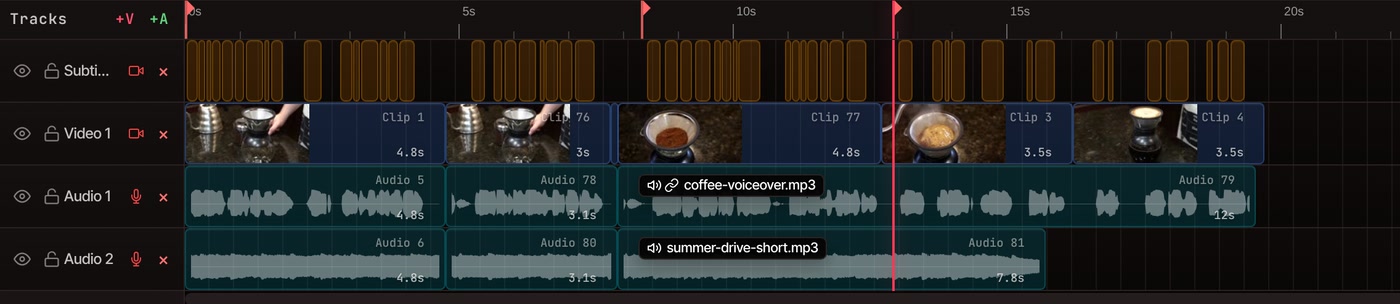
What a channel needs
Everything between the camera and the upload.
-
Cut by reading
Delete a stumble or a filler word from the transcript and the video follows. Silent gaps go in one click.
More on editing by text -
Captions on the picture
Every word is timed, so captions match your voice. Show them a word at a time or in full lines, or hide them and keep the transcript.
More on auto captions -
B-roll over your voice
Auto B-Roll searches free Pexels stock for what you are saying and lays clips on their own track. Swap any clip you don’t like.
More on auto b-roll -
Music under the talking
Drop your own track on an audio track and set its volume. VidTL doesn’t check music for copyright, so use tracks you have the right to.
More on adding music -
Titles and end screens
Start from an animated title, name tag, callout or end screen in the Graphics panel and change the words.
More on graphics templates -
A Shorts cut too
In the export window, tick Vertical 9:16 under Also create these sizes and one edit downloads as widescreen and vertical.
More on Shorts, Reels and TikTok
Free and Pro
The whole edit above is free. Pro adds the AI assistant, which can rough-cut a long recording or cut filler words for you.
Free covers cutting by text, captions, b-roll, music, chapters, thumbnail frames and the YouTube export presets, with no watermark and no length limit. Writing the transcript needs a free account with a confirmed email. Pro adds faster captions, AI music, voiceovers from text, and cloud exports that let you close the tab.
See plansQuestions
Questions about editing for YouTube.
Can I edit YouTube videos here for free?
Yes. The editor opens in your browser with nothing to install, and exports have no watermark on any plan. Cutting by text and captions are free with a free account. The AI assistant is the part that is Pro.
Can I upload to YouTube from VidTL?
Not directly. Export the video, then upload the file in YouTube Studio. The YouTube 1080p preset is 1920x1080 at 30 frames a second, and YouTube 4K is 3840x2160.
How do I add chapters to a YouTube video?
Add a marker at the start of each part, then type the times and names into your video’s description. YouTube’s rules, checked on its help page in October 2026: the first time must be 00:00, you need at least three, and each chapter runs at least 10 seconds. VidTL doesn’t write the description for you.
Can VidTL design my thumbnail?
It saves the frame at the playhead as a full-size picture, but it is not a thumbnail designer. The frame includes whatever is showing, so add a title with the Text tool first if you want words on it. Right-click the saved picture in the Media library and choose Download.
Can I edit a long video?
There is no length limit. Your own computer does the work, so a very long video takes longer and needs more memory. Keep the tab open and the window visible while it exports. Pro can export on VidTL’s servers instead, so you can close the tab.
Can I edit on my phone?
No. The editor needs a desktop or laptop computer, and on a phone it shows a Desktop computer required message. Chrome, Edge, Brave, Arc and Firefox all run it well, and Safari works for lighter editing.
Also in the editor
- Edit by text Cut a video by deleting words from its transcript.
- Auto captions Captions for the whole video, timed word by word.
- Remove silence Take out every long pause in one go.
- Auto B-Roll Stock clips laid over what you are saying.
- Add music Put a track under your voice and set the volume.
- Shorts, Reels and TikTok The vertical version of the same edit.
Finish the edit. Then upload it.
Free, in your browser, with no watermark and nothing to install.